| View previous topic :: View next topic |
| Author |
Message |
JRoza
Contributor


Joined: 17 Aug 2003
Posts: 182
Location: Netherlands
|
 Posted: Sun Aug 17, 2003 11:09 pm Post subject: Special way to use the RUN command? Posted: Sun Aug 17, 2003 11:09 pm Post subject: Special way to use the RUN command? |
 |
|
When highlighting a number of files with a specific extention (say all *.ima files) in the Explorer then pressing the Enter-key is sufficient to start the associated program (say X.exe) and process all the selected files. I want to do something similar in VDS. But no matter how I construct the RUN command it never processes all files. I tried "RUN x.exe <filename from list>" in a loop, "RUN x.exe *.ima", "RUN x.exe 1.ima, 2.ima, etc" but none has the same effect as selecting files in Explorer and hitting the Enter-key. Anyone has any solutions/suggestions?
Thanks a lot! |
|
| Back to top |
|
 |
FreezingFire
Admin Team

Joined: 23 Jun 2002
Posts: 3508
|
| Posted: Sun Aug 17, 2003 11:11 pm Post subject: |
|
|
Well if you're using parameters you should really start by using:
| Code: | | SHELL OPEN,my.exe,parameter1,parameter2, etc. |
I hope this helps some. 
_________________
FreezingFire
VDSWORLD.com
Site Admin Team |
|
| Back to top |
|
|
JRoza
Contributor
Joined: 17 Aug 2003
Posts: 182
Location: Netherlands
|
| Posted: Mon Aug 18, 2003 12:17 am Post subject: |
|
|
Thanks for your fast response, but that is not the problem.
You did help a little by pointing me to the SHELL command.
The problem is that "SHELL OPEN x.exe, *.ima" will not work. The SHELL command will issue a error message stating that file *.ima does not exist.
It does except a single filename. Still looking for a way to process all files in a single statement via the RUN or SHELL command other than looping through a list. |
|
| Back to top |
|
|
Dr. Dread
Professional Member


Joined: 03 Aug 2001
Posts: 1065
Location: Copenhagen, Denmark
|
| Posted: Mon Aug 18, 2003 6:01 am Post subject: |
|
|
Any special reason why you don't wanna do a loop? If you got it working with one file, then really
a repeat .. until loop is the thing to use.
Greetz
Dr. Dread
_________________
~~ Alcohol and calculus don't mix... Don't drink and derive! ~~
String.DLL * advanced string processing |
|
| Back to top |
|
|
JRoza
Contributor
Joined: 17 Aug 2003
Posts: 182
Location: Netherlands
|
| Posted: Mon Aug 18, 2003 10:33 am Post subject: |
|
|
The only reason why I want it as a single step process is that the called program shows a messagewindow with a progressbar which is shown anew with every call. If I can somehow call this program only once and make it process all selected files at once the dialog is shown only once and the progressbar really shows the progress of the whole process.
The called program is a utility not written by me and doesn't except wildcards so the only way to trigger it to proces all files in one go is via the Explorer with all files selected and pressing Enter. It's this process I want to imitate in my VDS program. |
|
| Back to top |
|
|
Dr. Dread
Professional Member
Joined: 03 Aug 2001
Posts: 1065
Location: Copenhagen, Denmark
|
| Posted: Mon Aug 18, 2003 12:07 pm Post subject: |
|
|
OK, that makes sense. But if your external prog accepts commandline input, it should be able to do
so from VDS as well.
1. You should feed complete filename paths to the external prog
2. To avoid problems with spaces in long filenames use @shortname() for each file to be opened (or quote the filename)
3. Do NOT (as in your own example) use commas in your command string for RUN - it will break the string off there.
So try something like this:
| Code: | %%file1 = @shortname(C:\My Documents\testing\1.ima)
%%file2 = @shortname(C:\My Documents\testing\2.ima)
RUN x.exe %%file1 %%file2 |
Greetz
Dr. Dread
_________________
~~ Alcohol and calculus don't mix... Don't drink and derive! ~~
String.DLL * advanced string processing |
|
| Back to top |
|
|
JRoza
Contributor
Joined: 17 Aug 2003
Posts: 182
Location: Netherlands
|
| Posted: Mon Aug 18, 2003 6:18 pm Post subject: |
|
|
Thanks again, but I've tried that and it doesn't work. The damned x.exe only processes file1 and doesn't seem to see the other files in the parameter. I've tried "RUN x.exe %%File1 %%File2", "RUN x.exe %%File1, %%File2" and all kind of other ways but without success.
The only way to let x.exe process more than one file at once is via the Explorer, selecting files and pressing Enter.
So I'm back at square one again.... I want to imitate this Windows behavior of selecting files and activating the associated program.
Any ideas? |
|
| Back to top |
|
|
SnarlingSheep
Professional Member

Joined: 13 Mar 2001
Posts: 759
Location: Michigan
|
| Posted: Tue Aug 19, 2003 5:00 am Post subject: |
|
|
I see you've tried something like: "SHELL OPEN,x.exe,file1,file2"
but have you tried: SHELL OPEN,x.exe,@CHR(34)file1 file2@CHR(34)
Just tossing in another possibility.
_________________
-Sheep
My pockets hurt... |
|
| Back to top |
|
|
Skit3000
Admin Team

Joined: 11 May 2002
Posts: 2166
Location: The Netherlands
|
| Posted: Tue Aug 19, 2003 3:50 pm Post subject: |
|
|
Maybe you should try it the other way around. Compile this program and assign a filetype to it. Then run it by selecting multiply files and press enter.
| Code: | | clipboard set,|%0|%1|%2|%3|%4|%5|%6|%7|%8|%9| |
Please paste the results you get into this forum.
_________________
[ Add autocomplete functionality to your VDS IDE windows! ]
Voor Nederlandse beginners met VDS: bekijk ook eens deze tutorial! |
|
| Back to top |
|
|
JRoza
Contributor
Joined: 17 Aug 2003
Posts: 182
Location: Netherlands
|
| Posted: Tue Aug 19, 2003 7:38 pm Post subject: |
|
|
Thanks guys,
Alas no solution still.
The CHR(34) solution gives the same problem as working with quotes.
Compiling the x.exe is no option since it is a compiled utility of which I don't have the source, it's an existing program.
So again we come down to my question: how to imitate activating an associated program to process a group of files |
|
| Back to top |
|
|
jwfv
Valued Contributor

Joined: 19 Mar 2002
Posts: 422
Location: Beaufort, SC
|
| Posted: Tue Aug 19, 2003 7:50 pm Post subject: |
|
|
I could be wrong, but I think Skit was saying to create a VDS program and send files to it via Windows Explorer (associate it with a made-up file extension.) Then view the parameters that were passed, in order to see the format that they are in. This may tell you how you have to send the parameters to your .EXE you are working with.
_________________
Joe Floyd |
|
| Back to top |
|
|
JRoza
Contributor
Joined: 17 Aug 2003
Posts: 182
Location: Netherlands
|
| Posted: Tue Aug 19, 2003 8:19 pm Post subject: |
|
|
Thanks Joe,
Now that's an idea!
I think you're right that that's what Skit meant.
I'll experiment with it and see what I can discover. |
|
| Back to top |
|
|
Skit3000
Admin Team
Joined: 11 May 2002
Posts: 2166
Location: The Netherlands
|
|
| Back to top |
|
|
CodeScript
Moderator Team

Joined: 08 Jun 2003
Posts: 1060
Location: India
|
| Posted: Thu Aug 21, 2003 10:31 am Post subject: |
|
|
Although I am not an expert in this.
You can examine the parameters the app uses by clicking Control Panel->
Folder options and then Select the .ima file in the Registered file types box then:
1. Advanced
2. Edit
As shown in the figure.
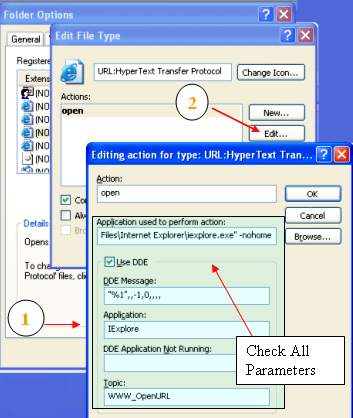
Now examine all the parameters in the blue box I shaded. (don't change anything !)
and try to imitate it.Remember that many apps use DDE to open files.
I am only imagining things right now as I have no access to your app.
Hope this helps.
Regards
_________________
Regards
- CodeScript
 Give your application a professional look with the VDSGUI Extension Give your application a professional look with the VDSGUI Extension |
|
| Back to top |
|
|
JRoza
Contributor
Joined: 17 Aug 2003
Posts: 182
Location: Netherlands
|
| Posted: Thu Aug 21, 2003 8:44 pm Post subject: |
|
|
Thanks Codescript!
That's a handy tip..... I'll sure look into this. |
|
| Back to top |
|
|
|

 FAQ
FAQ Search
 Memberlist
 Usergroups
 Register
 Profile
 Log in to check your private messages
 Log in


 @vdsworld