| View previous topic :: View next topic |
| Author |
Message |
Wraith
Newbie
Joined: 21 Oct 2003
Posts: 14
|
 Posted: Tue Oct 21, 2003 2:30 pm Post subject: Making an away msg'er respond to chat... ???? Posted: Tue Oct 21, 2003 2:30 pm Post subject: Making an away msg'er respond to chat... ???? |
 |
|
Hello,
I'd like to make a script that responds to ingame chat. Is it possible to make something where if someones name was used in the chat window a prgram could pick that up and enter in an away msg?
Please let me know what you think.
TIA,
Matt |
|
| Back to top |
|
 |
CodeScript
Moderator Team

Joined: 08 Jun 2003
Posts: 1060
Location: India
|
| Posted: Tue Oct 21, 2003 3:05 pm Post subject: |
|
|
I couldn't get your question fully, but I think sending keys "Window Send" may be the way to go.
_________________
Regards
- CodeScript
 Give your application a professional look with the VDSGUI Extension Give your application a professional look with the VDSGUI Extension |
|
| Back to top |
|
|
Wraith
Newbie
Joined: 21 Oct 2003
Posts: 14
|
| Posted: Tue Oct 21, 2003 3:25 pm Post subject: |
|
|
basicly i want to do this:
within a game
If someone says "hi matt" or anything with my name in it.
I'd like a program to know someone tried talking to me and reply with a message. I know its been done, I just dont know how.
What will "Window Send" do? |
|
| Back to top |
|
|
Skit3000
Admin Team

Joined: 11 May 2002
Posts: 2166
Location: The Netherlands
|
|
| Back to top |
|
|
CodeScript
Moderator Team
Joined: 08 Jun 2003
Posts: 1060
Location: India
|
| Posted: Tue Oct 21, 2003 4:21 pm Post subject: |
|
|
You can use window spy to obtain the window title or window class name to send the message.
_________________
Regards
- CodeScript
Give your application a professional look with the VDSGUI Extension |
|
| Back to top |
|
|
Garrett
Moderator Team
Joined: 04 Oct 2001
Posts: 2150
Location: A House
|
| Posted: Tue Oct 21, 2003 7:05 pm Post subject: |
|
|
The short answer to your question is: YES 
-Garrett
_________________
'What you do not want done to yourself, do not do to others.' - Confucius (550 b.c. to 479 b.c.) |
|
| Back to top |
|
|
FreezingFire
Admin Team

Joined: 23 Jun 2002
Posts: 3508
|
| Posted: Tue Oct 21, 2003 7:07 pm Post subject: |
|
|
You'll need to provide us with a more in-depth description if you
want an example.
What game is it? What is the class name of the window? Is it a
full-screen game? Does it use standard dialog boxes or is it a
heavy graphics game?
You will need to obtain the text of the chatbox with @wintext()
and then send keystrokes back if needed using WINDOW SEND.
You can read about those functions/commands in the VDS help
file.
_________________
FreezingFire
VDSWORLD.com
Site Admin Team |
|
| Back to top |
|
|
Wraith
Newbie
Joined: 21 Oct 2003
Posts: 14
|
| Posted: Wed Oct 22, 2003 3:38 am Post subject: |
|
|
I've been doing alot of reading. Im new to VDS, I've done some coding with MS access but nothing impressive. Unfortunetly I'm not finding much luck with the help files.
The game is called Dransik. It can be either full screen or windowed. With Window spy I get this for info on the game. [%7274992 #DRANSIK "Dransik (c)opyright 2001 Asylums..."]. As far as the chat area goes, I'm not sure.
Is there any other info you guys need to give me a hand? lol I basicly need a tutor :-/ |
|
| Back to top |
|
|
CodeScript
Moderator Team
Joined: 08 Jun 2003
Posts: 1060
Location: India
|
| Posted: Wed Oct 22, 2003 7:11 am Post subject: |
|
|
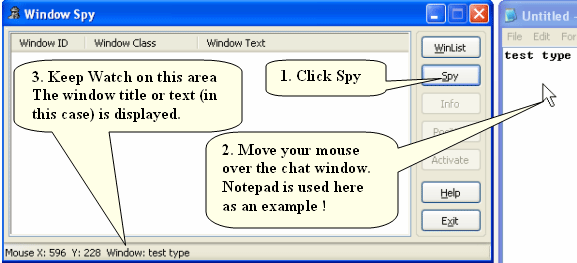
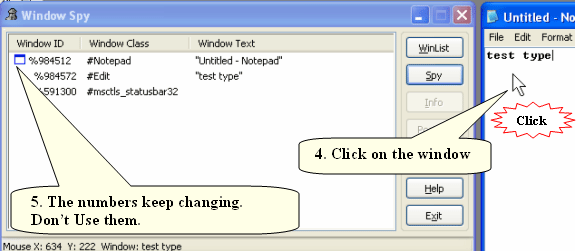
The above screenshots pretty well explain how to proceed to identify your chat window.
Just like the #Edit window above which is a child of #Notepad your chat window is child of a window above it.
You might face the typical problem seen in this example case.
You cannot use:
| Code: | | %%window = @winexists(#Edit) |
because there may be several of them and you will not
get a proper result.
So you should use something like :
| Code: | | %%window = @winexists(Untitled – Notepad,#Edit) |
Now check if you got something useful using a message box:
Info %%window is my chat window ID.
If there are more than 1 #Edit (#Edit is a symbolic name I take for example purposes. Your window class name will be different) windows are there in that app then you will get no value in the result.
If that happens then you should check whether the “Window Text” in the spy is the same as the typed contents of your chat window. If it is not then you are very lucky.
Just use that name to get your window ID.
| Code: | %%window = @winexists(my chat Window1)
Info %%window is my chat window ID. |
OR if it is a MDI child
| Code: | %%window = @winexists(Untitled – Notepad,my chat Window1)
Info %%window is my chat window ID. |
If none of the above help there still other methods to obtain the window ID
which are a bit advanced. I will not try to confuse you now.
Once you have the window ID confirm that it is indeed the chat window.
| Code: | | Info @wintext(%%window) |
This should show you a info box with the contents that match what you see in the
chat window. If not then it may be a LISTBOX etc rather than a simple Edit control
the methods needed are a bit advanced.
Now you need to check if a particular content is there in the chat window.
So you need to get the contents of the chat window into a “list”
| Code: | %%contents = @wintext(%%window)
List Create,1
List Append,1, %%contents
REM Now move the pointer in the list to first item,
List seek,1,0
Test if the line contains your desired string:
IF @MATCH(1,mydesiredstring)
LIST close,1
Goto reply
END
LIST close,1
REM Now you need to reply:
:Reply
Window send,%%window,I am very busy now. Please don’t disturb!! |
You also need to do the same procedure to identify the SEND button
and send a Enter key i.e @CR() to it so that your message is sent automatic.
Sorry I have not been able to provide you a complete code that you can just copy'npaste'run.
You can refer the C:\Program Files\Visual DialogScript 5\demos\SKTEST.DSC example for more details.
Hope this helps some. I think based on your progress more people may be able to help you.
| Wraith wrote: | | lol I basicly need a tutor :-/ |
You can also seek more help from:
Visual DialogScript Live Online Support System
http://www.dialogscript.com/onlinesup.html for Premium Level help if U want.
In the beginning you may feel that this is difficult but once you are familiar with it you will do the trick in minutes (may be within a month's time as I feel VDS is the easiest language in the world)
Good luck !!
_________________
Regards
- CodeScript
Give your application a professional look with the VDSGUI Extension
Last edited by CodeScript on Thu Oct 23, 2003 5:30 am; edited 1 time in total |
|
| Back to top |
|
|
FreezingFire
Admin Team
Joined: 23 Jun 2002
Posts: 3508
|
| Posted: Wed Oct 22, 2003 7:18 pm Post subject: |
|
|
Very well put CodeScript.
_________________
FreezingFire
VDSWORLD.com
Site Admin Team |
|
| Back to top |
|
|
Wraith
Newbie
Joined: 21 Oct 2003
Posts: 14
|
| Posted: Wed Oct 22, 2003 9:30 pm Post subject: |
|
|
Ok well I've been playing around with all the code you've given me(btw Thank you) but I'm getting an error in line 7 "Invalid list option". I dont see any misspelling, which the help file says. Any ideas?
When I press play I get my 2 info windows and click ok then I get the eror msg.
This is the code I was using:
Title Answering Machine
%%window = @winexists(#DRANSIK)
Info %%window is my chat window ID.
info @wintext(%%window)
%%contents = @wintext(%%window)
List Create,1
List Append,1, %%contents
REM Now move the pointer in the list to first item,
List seek,1,1
Test if the line contains your desired string:
IF @MATCH(1,test)
Goto reply
END
LIST close,1
REM Now you need to reply:
:Reply
Window send,%%window,t
Window send,%%window,It works!
Window send,%%window,@CR()
I added "Window send,%%window,t" because ingame I either need to hit a button or press "t" to open the chat prompt. |
|
| Back to top |
|
|
SnarlingSheep
Professional Member


Joined: 13 Mar 2001
Posts: 759
Location: Michigan
|
| Posted: Wed Oct 22, 2003 9:46 pm Post subject: |
|
|
I'm not sure why you have: List seek,200,200
but, I believe it should be: List seek,1,0
Lists are 0 based, 0 being the first position.
Hope that helps.
Edit: OK..now it doesn't say 200,200, am I going crazy?
_________________
-Sheep
My pockets hurt... |
|
| Back to top |
|
|
Wraith
Newbie
Joined: 21 Oct 2003
Posts: 14
|
| Posted: Wed Oct 22, 2003 9:49 pm Post subject: |
|
|
lol yeah sorry about that. I changed my post after I saw that. I thought that was a mouse possition at first and changed it to make sure it would be in the game window.
BTW: I changed it to 1,0 and still nothing. I get that error before VDS gets to that line. |
|
| Back to top |
|
|
vdsalchemist
Admin Team

Joined: 23 Oct 2001
Posts: 1448
Location: Florida, USA
|
| Posted: Thu Oct 23, 2003 1:34 am Post subject: |
|
|
Wraith,
Umm which version of VDS are you using?
You can't use this line because %%contents is not a List...
| Code: | | List Append,1, %%contents |
Try this line in place of it. It will add a single item to the list.
| Code: | | List Add,1, %%contents |
Also all VDS list start at item 0 so it would be
You don't want to read or write past the end of the list.
Below is your code corrected a little bit.
| Code: | Title Answering Machine
%%window = @winexists(#DRANSIK)
Info %%window is my chat window ID.
info @wintext(%%window)
%%contents = @wintext((#DRANSIK)
List Create,1
REM If the edit box only has one line in it the List Add will do.
List Add,1, %%contents
Rem If your edit box has more than one line and has carriage returns
rem you may consider using
rem List Assign,1,%%contents
rem This will place each line in a seperate item in the list
REM Now move the pointer in the list to first item, The first item in all
rem VDS lists is 0 (ie...Zero)
List seek,1,0
Rem Test if the line contains your desired string:
IF @MATCH(1,test)
Rem if you use Goto here then you will never reach the List Close,1 line
rem below so you can use a GoSub instead. A GoSub will Return when it
rem reaches an Exit command.
GoSub reply
END
LIST close,1
REM Now you need to reply:
:Reply
Window send,%%window,t
Window send,%%window,It works!
Window send,%%window,@CR()
Rem Always make sure you end a sub-routine with an Exit or Stop
rem command.
Exit
|
Have fun...
_________________
Home of

Give VDS a new purpose!
 |
|
| Back to top |
|
|
CodeScript
Moderator Team
Joined: 08 Jun 2003
Posts: 1060
Location: India
|
| Posted: Thu Oct 23, 2003 5:28 am Post subject: |
|
|
Oops List Seek,1,1 was a oversight
It should be
Also it seems you are not using VDS 5
as mindpower said so List Append fails.
The above code should work but
none of us have details of your game.
As it looks from a screen shot of the game:
#DRANSIK is the class name of your main window.
| Quote: | within a game
If someone says "hi matt" or anything with my name in it. |
Where does this appear ?
On the main window itself?
or
A window within it ?
Most likely it is a text/list box or a child window:
So confirm that:
| Code: | | Info @wintext(%%window) |
is showing you the exact contents of the
window you want to watch (Hi Matt or something) and NOT "Dransik (c)opyright 2001 Asylums..
If the above happens open window spy again
and click spy and move your mouse cursor over the
text area of interest to see the name of the window and click it to
see the details as I showed in the screenshot.
Also mention the window text and #className of that text window so
that others can help you more.
The method of getting the entire contents of a listbox is totally
different from what we have been doing till now.
Also you said you have to press "t" to open chat window.
This means that the chat window has a different ID.
So you have to obtain it's ID in the same way as you did for
the main window and use "window send" to send reply with that ID.
_________________
Regards
- CodeScript
Give your application a professional look with the VDSGUI Extension |
|
| Back to top |
|
|
|

 FAQ
FAQ Search
 Memberlist
 Usergroups
 Register
 Profile
 Log in to check your private messages
 Log in


 @vdsworld