| View previous topic :: View next topic |
| Author |
Message |
Tdk161
Valued Contributor


Joined: 08 Feb 2005
Posts: 399
Location: ITALY
|
 Posted: Thu Jan 04, 2007 10:09 pm Post subject: Some one can help me please? - SOLVE Posted: Thu Jan 04, 2007 10:09 pm Post subject: Some one can help me please? - SOLVE |
 |
|
Hi 
for a lot of time i have this trouble with vds5.1
when i include in my project a dsu unit when run project happen this error:
.
....
Err: Cannot open .....\xxx.dsu
....
.....
This happen with any dsu unit.
How I Can solve it?
Many thanks in advance for any info
Last edited by Tdk161 on Thu Jan 25, 2007 11:24 am; edited 1 time in total |
|
| Back to top |
|
 |
Serge
Professional Member


Joined: 04 Mar 2002
Posts: 1480
Location: Australia
|
| Posted: Fri Jan 05, 2007 2:29 am Post subject: |
|
|
you have not included any code, so it makes it hard for us to see where the problem is
the only things i can suggest at the moment are:
1. make sure that you are in the right directory in order to load your dsu files
2. make sure you use the right code to load your dsu files
both can be accomplished via:
| Code: |
directory change, @path(%0)
#include file.dsu
|
i would further suggest that you load your dsu at the very start of your program, even before the gui is displayed ... that's what i always do
hope this helps
serge
_________________
|
|
| Back to top |
|
|
Tdk161
Valued Contributor
Joined: 08 Feb 2005
Posts: 399
Location: ITALY
|
| Posted: Fri Jan 05, 2007 12:41 pm Post subject: |
|
|
**--->added line : directory change,@path(%0)
#Include DynPos.dsu
Title SimpleDemo
DIALOG CREATE,DynPos Simple Demo,-1,0,240,159,RESIZABLE,CLASS SimpleDemoWn
DIALOG ADD,MENU,File
DIALOG ADD,COMBO,COMBO1,3,3,234,21
DIALOG ADD,EDIT,EDIT1,27,3,234,111,,,MULTI
DIALOG ADD,STATUS,STATUS1,STATUS1
DIALOG SHOW
# Syntax: Dynpos Initialize,<dialog's class name>
Dynpos Initialize,#SimpleDemoWn
# Syntax: DynPos Add,<element name>,<flags "TLWH">,{<parent element name> unless parent is main dialog}
DynPos Add,COMBO1,W
Dynpos Add,EDIT1,WH
:FileMENU
:Evloop
wait event
goto @event()
:Resize
# Syntax: DynPos ResizeDone,{<min width(int)>,<min height(int)> Optional}
DynPos ResizeDone
# Any other resizing code here
goto evloop
:Close
# "Free" Forces Cleanup (you could "Initialize" after Free to change main window)
DynPos Free
exit
For example, any of my old script work with included <dsu units 
Many thanks
|
|
| Back to top |
|
|
Hooligan
VDS Developer


Joined: 28 Oct 2003
Posts: 480
Location: California
|
| Posted: Fri Jan 05, 2007 1:51 pm Post subject: |
|
|
I've had problems in the past with runtime dlls being different versions. There are 3 versions of vds 5... V 5.0.0, V 5.0.1 & V 5.0.2. You may want to make sure your DSU is compiled under the same version as your script you're calling it from...
Hooligan
_________________
Hooligan
Why be normal? |
|
| Back to top |
|
|
vdsalchemist
Admin Team

Joined: 23 Oct 2001
Posts: 1448
Location: Florida, USA
|
|
| Back to top |
|
|
Tdk161
Valued Contributor
Joined: 08 Feb 2005
Posts: 399
Location: ITALY
|
| Posted: Sat Jan 06, 2007 7:43 pm Post subject: |
|
|
 Sorry Guyz but I used all your info but nothing change Sorry Guyz but I used all your info but nothing change 
Many thanks to all
and I don't know what I can make to solve It.......

|
|
| Back to top |
|
|
Serge
Professional Member
Joined: 04 Mar 2002
Posts: 1480
Location: Australia
|
| Posted: Sun Jan 07, 2007 2:26 am Post subject: |
|
|
i noticed you had
| Code: |
**--->added line : directory change,@path(%0)
#Include DynPos.dsu
|
it should be
| Code: |
directory change,@path(%0)
#Include DynPos.dsu
|
also, have you tried (not sure if use of capitals is a problem when filename could be in lower case) ... just a thought
| Code: |
directory change,@path(%0)
#include dynpos.dsu |
serge
_________________
|
|
| Back to top |
|
|
DaveR
Valued Contributor

Joined: 03 Sep 2005
Posts: 413
Location: Australia
|
| Posted: Sun Jan 07, 2007 4:25 am Post subject: |
|
|
| Serge wrote: | | Code: |
directory change,@path(%0)
#Include DynPos.dsu
|
|
Does this actually work  
Directory change is a runtime command, while #include is a compiler directive.
From the help file re #include: | Quote: | | If a full path is not specified, the compiler looks first in the project's main directory, and then in a special include folder that can be set using the IDE Options menu. |
So to use #include you have 3 choices.
1.) Place the file to be included in the project's main directory.
2.) Place the file to be included in the project's 'include' directory (as setup via 'View menu > Project Manager > Folders'
3.) Specifiy the full path to the file to be included. e.g. #include C:\myincludes\my.dsu
_________________
cheers
Dave |
|
| Back to top |
|
|
DaveR
Valued Contributor
Joined: 03 Sep 2005
Posts: 413
Location: Australia
|
| Posted: Sun Jan 07, 2007 4:36 am Post subject: |
|
|
| dragonsphere wrote: | Tdk161,
Have you checked this screen. Take a look at attached screen shot. VDS will look in the include directory for your DSU. If no directory is there it should look in the directory where the *.dsp file is located.
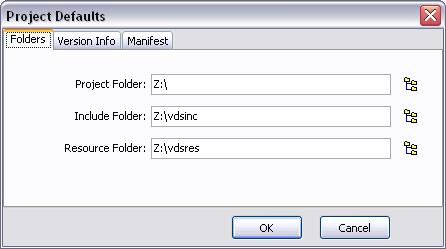
|
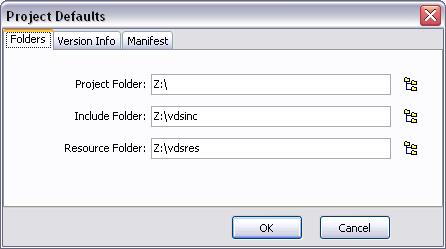
This sets the default include folder for all projects.
I always use 'View menu > Project Manager > Folders' to set each project's own include folder.
_________________
cheers
Dave |
|
| Back to top |
|
|
Serge
Professional Member
Joined: 04 Mar 2002
Posts: 1480
Location: Australia
|
| Posted: Mon Jan 08, 2007 2:39 am Post subject: |
|
|
| Quote: | | Does this actually work |
good question ... i must say that i never tried it any other way ... from memory, i started doing this when i noticed that EXTERNAL sometimes did and sometimes did not work and i found out that i had to make sure to be in the correct/home folder for it to work
since then, i also do it that way ... may be you are right
serge
_________________
|
|
| Back to top |
|
|
jules
Professional Member

Joined: 14 Sep 2001
Posts: 1043
Location: Cumbria, UK
|
| Posted: Mon Jan 08, 2007 9:31 am Post subject: |
|
|
He quite categorically is right. The directives that start with # are processed by the compiler. The compiler does not execute the directory change command, it only compiles it. It works with EXTERNAL because that is a command, executed at runtime, not a compiler directive.
_________________
The Tech Pro
www.tech-pro.net |
|
| Back to top |
|
|
vdsalchemist
Admin Team
Joined: 23 Oct 2001
Posts: 1448
Location: Florida, USA
|
| Posted: Mon Jan 08, 2007 2:46 pm Post subject: |
|
|
Tdk161,
Please goto http://www.dialogscript.com and install the latest build of VDS. I think this is part of the issue.
_________________
Home of

Give VDS a new purpose!
 |
|
| Back to top |
|
|
Tdk161
Valued Contributor
Joined: 08 Feb 2005
Posts: 399
Location: ITALY
|
| Posted: Thu Jan 18, 2007 6:45 pm Post subject: |
|
|
     
WORK!!!!!!!!!!!!!!!!!!
MANY MANY MANY THANKS
|
|
| Back to top |
|
|
vdsalchemist
Admin Team
Joined: 23 Oct 2001
Posts: 1448
Location: Florida, USA
|
| Posted: Thu Jan 18, 2007 10:02 pm Post subject: |
|
|
Tdk,
I am very glad to hear that it is working for you but can you tell us what fixed the issue you were having?
_________________
Home of
Give VDS a new purpose!
|
|
| Back to top |
|
|
Tdk161
Valued Contributor
Joined: 08 Feb 2005
Posts: 399
Location: ITALY
|
| Posted: Thu Jan 25, 2007 11:23 am Post subject: |
|
|
| well, but I don't know this, I think that some WinXp Update is incompatibily with vds 5 and ver of vds 5.2 resolve it......maybe
|
|
| Back to top |
|
|
|

 FAQ
FAQ Search
 Memberlist
 Usergroups
 Register
 Profile
 Log in to check your private messages
 Log in




 @vdsworld