| View previous topic :: View next topic |
| Author |
Message |
Garrett
Moderator Team
Joined: 04 Oct 2001
Posts: 2149
Location: A House
|
 Posted: Fri Apr 18, 2003 9:29 pm Post subject: Side Tab Example and Net DDE Problem Posted: Fri Apr 18, 2003 9:29 pm Post subject: Side Tab Example and Net DDE Problem |
 |
|
Has anyone else ran into this:
Running the side tab example, clicking on tab 6 and a Net DDE window
opens up.
FreezingFire ran into this. He then REM'd out the @sendmsg(%Z,$0B,0,0)
and @sendmsg(%Z,$0B,1,0) lines and then the above does not happen.
Anyone know how or why this would happen?
Thanks,
-Garrett |
|
| Back to top |
|
 |
FreezingFire
Admin Team

Joined: 23 Jun 2002
Posts: 3508
|
| Posted: Fri Apr 18, 2003 9:37 pm Post subject: |
|
|
Here's a screenshot of what happens:
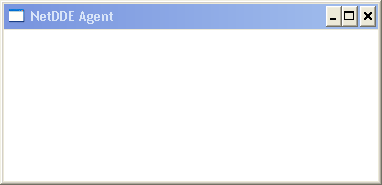
And be clear that it's the "Chapter 6" tab, not the 6th tab. 
I find odd. I'm running Windows XP Pro with a 1.79GHz Intel Pentium
Processor and 256 MB of RAM.
This problem is present in both the IDE and a compiled script.
_________________
FreezingFire
VDSWORLD.com
Site Admin Team |
|
| Back to top |
|
|
FreezingFire
Admin Team
Joined: 23 Jun 2002
Posts: 3508
|
| Posted: Fri Apr 18, 2003 9:38 pm Post subject: |
|
|
Oh, also, this window doesn't open until I click around on the dialog after
clicking on the "Chapter 6" tab. Before clicking around on the dialog it's
just a "busy" cursor.
_________________
FreezingFire
VDSWORLD.com
Site Admin Team |
|
| Back to top |
|
|
LOBO
Valued Contributor


Joined: 14 Mar 2002
Posts: 241
Location: Wilmington, Delaware, USA
|
| Posted: Fri Apr 18, 2003 10:28 pm Post subject: |
|
|
Yes, I had the same issue happen.
-Mark |
|
| Back to top |
|
|
FreezingFire
Admin Team
Joined: 23 Jun 2002
Posts: 3508
|
| Posted: Fri Apr 18, 2003 10:31 pm Post subject: |
|
|
I wasn't able to close the NetDDE Agent window until I restarted my
computer but it caused no harm etc.
I think it's somehow related to the APIs and how they cause the elements
to be changed. Perhaps it's conflicting with the window. 
_________________
FreezingFire
VDSWORLD.com
Site Admin Team |
|
| Back to top |
|
|
Garrett
Moderator Team
Joined: 04 Oct 2001
Posts: 2149
Location: A House
|
| Posted: Sat Apr 19, 2003 4:02 am Post subject: |
|
|
I removed the @sendmsg() lines and updated the listing of this
example at VDS World.
Though I'd still like to know how and why this happens, it's no
longer an issue in the example.
-Garrett |
|
| Back to top |
|
|
vdsalchemist
Admin Team

Joined: 23 Oct 2001
Posts: 1448
Location: Florida, USA
|
| Posted: Mon Apr 21, 2003 2:23 pm Post subject: Re: Side Tab Example and Net DDE Problem |
|
|
| Garrett wrote: | Has anyone else ran into this:
Running the side tab example, clicking on tab 6 and a Net DDE window
opens up.
FreezingFire ran into this. He then REM'd out the @sendmsg(%Z,$0B,0,0)
and @sendmsg(%Z,$0B,1,0) lines and then the above does not happen.
Anyone know how or why this would happen?
Thanks,
-Garrett |
What side tab example? Also it would help if I knew the name of the Message ID that you are trying to send the the element? Not to mention what type of element you are trying to send this message too?
_________________
Home of

Give VDS a new purpose!
 |
|
| Back to top |
|
|
vdsalchemist
Admin Team
Joined: 23 Oct 2001
Posts: 1448
Location: Florida, USA
|
| Posted: Mon Apr 21, 2003 2:50 pm Post subject: |
|
|
| FreezingFire wrote: | I wasn't able to close the NetDDE Agent window until I restarted my
computer but it caused no harm etc.
I think it's somehow related to the APIs and how they cause the elements
to be changed. Perhaps it's conflicting with the window. |
These API's do not cause the elements to change. They are messages that the Elements are programmed with. In Windows programming you have a message loop similiar to VDS'es Event loop. When you use @Sendmsg to send the values to the window/element/control the message loop forwards the message to the proper function to be processed in either a big if/else/end or usually a (switch or select)/case condition. It's just a number that tells the window's application what part of the if/else/end condition to perform. C code ahead....
| Code: |
// application entry point
int APIENTRY WinMain(HINSTANCE hInst,HINSTANCE hPrev,LPSTR line,int CmdShow)
{
MSG msg;
g_hInst = hInst;
Init(hInst); //I initialize the main window..
while(GetMessage(&msg,0,0,0)) //I am the Message API Loop
{
TranslateMessage(&msg); //I translate the message so the rest of the program can understand it better.
DispatchMessage(&msg); //I dispatch the message to the proper routines.
}
return 0;
}
// initlize application
void Init(HINSTANCE hInst)
{
// I initialize the main window...
// I give it a class name and set all of its colors and styles
// I also tell the message loop where to dispatch it's messages too
WNDCLASS wc;
wc.cbClsExtra = 0;
wc.cbWndExtra = 0;
wc.hbrBackground = (HBRUSH) GetStockObject(LTGRAY_BRUSH);
wc.hInstance = hInst;
wc.hIcon = LoadIcon(hInst,MAKEINTRESOURCE(IDI_ICON1));
wc.hCursor = LoadCursor(NULL,IDC_ARROW);
wc.lpfnWndProc = (WNDPROC) WndProc; // I am the memory address of the Main window Processor.
wc.lpszClassName = "thisC";
wc.lpszMenuName = MAKEINTRESOURCE(IDR_MENU1);
wc.style = CS_HREDRAW | CS_VREDRAW;
RegisterClass(&wc); // I register the class for the Main Window
// I actually create the window and assign a Window Handle/ID
hwnd = CreateWindow("ThisC","Main window in C ( Johnny Kinsey)",WS_OVERLAPPEDWINDOW,CW_USEDEFAULT,CW_USEDEFAULT,230,220,0,0,hInst,0);
ShowWindow(hwnd,SW_SHOW); // I show the Main Window
UpdateWindow(hwnd); // I tell the Main window to paint itself one time.
}
// main window callback function
LRESULT APIENTRY WndProc(HWND hwnd,UINT msg,WPARAM wParam,LPARAM lParam)
{
// I am the main window processor and I have a memory address.
switch(msg)
{
case WM_DESTROY: //Hi I am a Message API ID. I equal $02 in VDS
PostQuitMessage(0);
break;
case WM_CREATE: //Hi I am another Message API ID.
{
edit = CreateWindow("Edit",NULL,WS_CHILD | WS_VISIBLE | WS_BORDER ,5,5,100,20,hwnd,(HMENU)ID_EDIT,g_hInst,0);
button = CreateWindow("Button","Title",WS_CHILD | WS_VISIBLE | BS_PUSHBUTTON,110,5,75,25,hwnd,(HMENU)ID_BUTTON,g_hInst,0);
stat = CreateWindow("Static","Static Label",WS_CHILD | WS_VISIBLE,5,30,200,25,hwnd,(HMENU)ID_STAT,g_hInst,0);
list = CreateWindow("ListBox",NULL,WS_CHILD | WS_VISIBLE | LBS_STANDARD,5,60,100,100,hwnd,(HMENU)ID_LIST,g_hInst,0);
combo = CreateWindow("ComboBox",NULL,WS_CHILD | WS_VISIBLE | CBS_DROPDOWN,115,60,100,20,hwnd,(HMENU)ID_COMBO,g_hInst,0);
}
break;
case WM_COMMAND: //Hi I am a message API ID
{
switch(wParam)
{
case ID_FILEEXIT: //Hi I am another Message API but my programmer made me up. I am not part of the Win32 API... I am actually a menu ID so I will send my Main window a close message...
SendMessage(hwnd,WM_CLOSE,0,0);
break;
}
switch(HIWORD(wParam))
{
case BN_CLICKED: // Hi I am another Message API.
switch(LOWORD(wParam))
{
case ID_BUTTON: //I am another Message API
MessageBox(hwnd,"You clicked the button","Yep",MB_OK | MB_ICONINFORMATION);
break;
}
break;
}
}
default: return DefWindowProc(hwnd,msg,wParam,lParam);
}
return 0;
} |
Naturally you could not place this into a C compilier and compile it. I don't show several global variables and header/include files that make this thing tick... Anyway it should illustrate what a Message API ID is and what really happens to it when C or Delphi or anyother language processes the Message ID.... this example is not to learn C but rather just to learn what a Message API ID is and used for... It does not transform a window/element/control in anyway. All it does is set a switch to tell the window/element/control to go into another mode that it was already programmed to be able to do in the first place.
_________________
Home of
Give VDS a new purpose!
|
|
| Back to top |
|
|
vdsalchemist
Admin Team
Joined: 23 Oct 2001
Posts: 1448
Location: Florida, USA
|
| Posted: Mon Apr 21, 2003 4:57 pm Post subject: |
|
|
Ok I found the side tabs example but because Garrett took out those lines I still don't know what the Messages do or what element they are being sent to  Garrett please give me a clue Garrett please give me a clue
_________________
Home of
Give VDS a new purpose!
|
|
| Back to top |
|
|
FreezingFire
Admin Team
Joined: 23 Jun 2002
Posts: 3508
|
| Posted: Mon Apr 21, 2003 5:16 pm Post subject: |
|
|
Garrett told me when I first asked him about this that the APIs changed
the element so that they couldn't be updated until the next API that
corresponded with the first one was sent.
_________________
FreezingFire
VDSWORLD.com
Site Admin Team |
|
| Back to top |
|
|
vdsalchemist
Admin Team
Joined: 23 Oct 2001
Posts: 1448
Location: Florida, USA
|
| Posted: Mon Apr 21, 2003 5:39 pm Post subject: |
|
|
| FreezingFire wrote: | Garrett told me when I first asked him about this that the APIs changed
the element so that they couldn't be updated until the next API that
corresponded with the first one was sent. |
Ok so it is the WM_SETREDRAW message  Hmmmm....Strange that it does not work... After sending this message like @Sendmsg(%Z,$0B,1,0) send a WM_PAINT message as well @Sendmsg(%Z,$0F,0,0) and see if this will stop that Net DDE window from popping up... Hmmmm....Strange that it does not work... After sending this message like @Sendmsg(%Z,$0B,1,0) send a WM_PAINT message as well @Sendmsg(%Z,$0F,0,0) and see if this will stop that Net DDE window from popping up...
The WM_SETREDRAW message only tells the window if it is ok to draw in the window. It does not tell it to redraw the window. The repainting could be getting out of sync in the message queue.
Here take a look at this MSDN website...
http://msdn.microsoft.com/library/default.asp?url=/library/en-us/gdi/pantdraw_3jxz.asp Mainly the Remarks: Section at that bottom.
_________________
Home of
Give VDS a new purpose!
|
|
| Back to top |
|
|
Garrett
Moderator Team
Joined: 04 Oct 2001
Posts: 2149
Location: A House
|
| Posted: Mon Apr 21, 2003 9:07 pm Post subject: |
|
|
I'm not sure the title of the api, but I'll grab the vds code I use for this...
BRB
-Garrett |
|
| Back to top |
|
|
Garrett
Moderator Team
Joined: 04 Oct 2001
Posts: 2149
Location: A House
|
| Posted: Mon Apr 21, 2003 9:09 pm Post subject: |
|
|
__________________________________________________________________________________________________________________________
Here's the original code.
| Code: | :SHOWTAB
%Z = @winexists(~SHAPE%%CT)
%A = @sendmsg(%Z,$0B,0,0)
DIALOG SET,SHAPE%%CT,BACKGROUND
DIALOG SETPOS,SHAPE%%CT,@dlgpos(SHAPE%%CT,T),@fsub(@dlgpos(SHAPE%%CT,L),4),@sum(@dlgpos(SHAPE%%CT,W),4),@dlgpos(SHAPE%%CT,H)
DIALOG SETPOS,TEXT%%CT,@dlgpos(TEXT%%CT,T),@fsub(@dlgpos(TEXT%%CT,L),4),@sum(@dlgpos(TEXT%%CT,W),4),@dlgpos(TEXT%%CT,H)
%A = @sendmsg(%Z,$0B,1,0)
EXIT
:HIDETAB
%Z = @winexists(~SHAPE%%CT)
%A = @sendmsg(%Z,$0B,0,0)
DIALOG SET,SHAPE%%CT,GRAY
DIALOG SETPOS,SHAPE%%CT,@dlgpos(SHAPE%%CT,T),@sum(@dlgpos(SHAPE%%CT,L),4),@fsub(@dlgpos(SHAPE%%CT,W),4),@dlgpos(SHAPE%%CT,H)
DIALOG SETPOS,TEXT%%CT,@dlgpos(TEXT%%CT,T),@sum(@dlgpos(TEXT%%CT,L),4),@fsub(@dlgpos(TEXT%%CT,W),4),@dlgpos(TEXT%%CT,H)
%A = @sendmsg(%Z,$0B,1,0)
EXIT |
-Garrett |
|
| Back to top |
|
|
vdsalchemist
Admin Team
Joined: 23 Oct 2001
Posts: 1448
Location: Florida, USA
|
| Posted: Tue Apr 22, 2003 1:48 pm Post subject: |
|
|
| Garrett wrote: | __________________________________________________________________________________________________________________________
Here's the original code.
| Code: | :SHOWTAB
%Z = @winexists(~SHAPE%%CT)
%A = @sendmsg(%Z,$0B,0,0)
DIALOG SET,SHAPE%%CT,BACKGROUND
DIALOG SETPOS,SHAPE%%CT,@dlgpos(SHAPE%%CT,T),@fsub(@dlgpos(SHAPE%%CT,L),4),@sum(@dlgpos(SHAPE%%CT,W),4),@dlgpos(SHAPE%%CT,H)
DIALOG SETPOS,TEXT%%CT,@dlgpos(TEXT%%CT,T),@fsub(@dlgpos(TEXT%%CT,L),4),@sum(@dlgpos(TEXT%%CT,W),4),@dlgpos(TEXT%%CT,H)
%A = @sendmsg(%Z,$0B,1,0)
Rem Tell VDS to redraw your element with a WM_PAINT message
%A = @sendmsg(%Z,$0F,0,0)
EXIT
:HIDETAB
%Z = @winexists(~SHAPE%%CT)
%A = @sendmsg(%Z,$0B,0,0)
DIALOG SET,SHAPE%%CT,GRAY
DIALOG SETPOS,SHAPE%%CT,@dlgpos(SHAPE%%CT,T),@sum(@dlgpos(SHAPE%%CT,L),4),@fsub(@dlgpos(SHAPE%%CT,W),4),@dlgpos(SHAPE%%CT,H)
DIALOG SETPOS,TEXT%%CT,@dlgpos(TEXT%%CT,T),@sum(@dlgpos(TEXT%%CT,L),4),@fsub(@dlgpos(TEXT%%CT,W),4),@dlgpos(TEXT%%CT,H)
%A = @sendmsg(%Z,$0B,1,0)
Rem Tell VDS to redraw your element with a WM_PAINT message
%A = @sendmsg(%Z,$0F,0,0)
EXIT |
-Garrett |
Garrett,
I Added the WM_PAINT message to your code as the last line in each of your Sub-Routines. This should solve your problem. If not let me know and I will do some more digging on this.
_________________
Home of
Give VDS a new purpose!
|
|
| Back to top |
|
|
|
|
You cannot post new topics in this forum
You cannot reply to topics in this forum
You cannot edit your posts in this forum
You cannot delete your posts in this forum
You cannot vote in polls in this forum
You can attach files in this forum
You can download files in this forum
|
|

 FAQ
FAQ Search
 Memberlist
 Usergroups
 Register
 Profile
 Log in to check your private messages
 Log in


 @vdsworld