| View previous topic :: View next topic |
| Author |
Message |
henrywood
Contributor

Joined: 21 Sep 2004
Posts: 66
Location: Copenhagen, Denmark
|
 Posted: Mon May 07, 2007 12:12 pm Post subject: Using GadgetX to display a printer setup/preferences dialog? Posted: Mon May 07, 2007 12:12 pm Post subject: Using GadgetX to display a printer setup/preferences dialog? |
 |
|
Hi all !
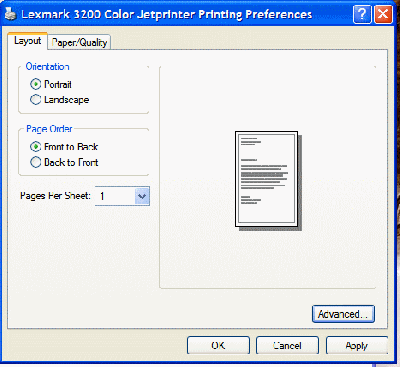
How can I show the attached preferences dialog for a named printer, ie. if I know the name of a printer is there any way to bring up the attached dialog using VDS and Gadget X ?
Henrik
| Description: |
|
| Filesize: |
26.47 KB |
| Viewed: |
1960 Time(s) |
|
|
|
| Back to top |
|
 |
henrywood
Contributor
Joined: 21 Sep 2004
Posts: 66
Location: Copenhagen, Denmark
|
| Posted: Mon May 07, 2007 1:36 pm Post subject: |
|
|
I solved this using C++ instead
Henrik
|
|
| Back to top |
|
|
Aslan
Valued Contributor


Joined: 31 May 2001
Posts: 589
Location: Memphis, TN USA
|
| Posted: Tue May 08, 2007 1:14 am Post subject: |
|
|
Care to share 
|
|
| Back to top |
|
|
henrywood
Contributor
Joined: 21 Sep 2004
Posts: 66
Location: Copenhagen, Denmark
|
| Posted: Tue May 08, 2007 1:34 am Post subject: |
|
|
Of course 
| Code: |
#include "stdafx.h"
#include "winspool.h"
#include "WinGDI.h"
/////////////////////////////////////////////////////////////////////////////////////////////////////////////////////////////////////////////////////////
//
// showPrinterPreferences(LPTSTR printerName)
//
// Shows the Properties->Printer Preferences for a named printer
//
/////////////////////////////////////////////////////////////////////////////////////////////////////////////////////////////////////////////////////////
CPUPU_API BOOL showPrintPreferences(LPTSTR pPrinterName) {
HANDLE hPrinter = NULL;
DWORD dwNeeded = 0;
PRINTER_INFO_2 *pi2 = NULL;
DEVMODE *pDevMode = NULL;
PRINTER_DEFAULTS pd;
BOOL bFlag;
LONG lFlag;
// Open printer handle (on Windows NT, you need full-access because you
// will eventually use SetPrinter)...
ZeroMemory(&pd, sizeof(pd));
pd.DesiredAccess = PRINTER_ALL_ACCESS;
bFlag = OpenPrinter(pPrinterName, &hPrinter, &pd);
if (!bFlag || (hPrinter == NULL))
return FALSE;
// The first GetPrinter tells you how big the buffer should be in
// order to hold all of PRINTER_INFO_2. Note that this should fail with
// ERROR_INSUFFICIENT_BUFFER. If GetPrinter fails for any other reason
// or dwNeeded isn't set for some reason, then there is a problem...
SetLastError(0);
bFlag = GetPrinter(hPrinter, 2, 0, 0, &dwNeeded);
if ((!bFlag) && (GetLastError() != ERROR_INSUFFICIENT_BUFFER) ||
(dwNeeded == 0))
{
ClosePrinter(hPrinter);
return FALSE;
}
// Allocate enough space for PRINTER_INFO_2...
pi2 = (PRINTER_INFO_2 *)GlobalAlloc(GPTR, dwNeeded);
if (pi2 == NULL)
{
ClosePrinter(hPrinter);
return FALSE;
}
// The second GetPrinter fills in all the current settings, so all you
// need to do is modify what you're interested in...
bFlag = GetPrinter(hPrinter, 2, (LPBYTE)pi2, dwNeeded, &dwNeeded);
if (!bFlag)
{
GlobalFree(pi2);
ClosePrinter(hPrinter);
return FALSE;
}
// If GetPrinter didn't fill in the DEVMODE, try to get it by calling
// DocumentProperties...
// We don't want that DEVMODE, even if it does exist.
// Use the one from DocumentProperties...
if (bFlag)
{
dwNeeded = DocumentProperties(NULL, hPrinter,
pPrinterName,
NULL, NULL, 0);
if (dwNeeded <= 0)
{
GlobalFree(pi2);
ClosePrinter(hPrinter);
return FALSE;
}
pDevMode = (DEVMODE *)GlobalAlloc(GPTR, dwNeeded);
if (pDevMode == NULL)
{
GlobalFree(pi2);
ClosePrinter(hPrinter);
return FALSE;
}
lFlag = DocumentProperties(NULL, hPrinter,
pPrinterName,
pDevMode, NULL,
DM_OUT_BUFFER | DM_PROMPT);
if (lFlag != IDOK || pDevMode == NULL)
{
GlobalFree(pDevMode);
GlobalFree(pi2);
ClosePrinter(hPrinter);
return FALSE;
}
pi2->pDevMode = pDevMode;
}
// Do not attempt to set security descriptor...
pi2->pSecurityDescriptor = NULL;
// Show dialog - Make sure the driver-dependent part of devmode is updated...
lFlag = DocumentProperties(NULL, hPrinter,
pPrinterName,
pi2->pDevMode, pi2->pDevMode,
DM_IN_BUFFER | DM_OUT_BUFFER);
if (lFlag != IDOK)
{
GlobalFree(pi2);
ClosePrinter(hPrinter);
if (pDevMode)
GlobalFree(pDevMode);
return FALSE;
}
// Update printer information...
bFlag = SetPrinter(hPrinter, 2, (LPBYTE)pi2, 0);
if (!bFlag)
// The driver doesn't support, or it is unable to make the change...
{
GlobalFree(pi2);
ClosePrinter(hPrinter);
if (pDevMode)
GlobalFree(pDevMode);
return FALSE;
}
// Tell other apps that there was a change...
SendMessageTimeout(HWND_BROADCAST, WM_DEVMODECHANGE, 0L,
(LPARAM)(LPCSTR)pPrinterName,
SMTO_NORMAL, 1000, NULL);
// Clean up...
if (pi2)
GlobalFree(pi2);
if (hPrinter)
ClosePrinter(hPrinter);
if (pDevMode)
GlobalFree(pDevMode);
return TRUE;
} // func
////////////////////////////////////////////////////////////////////////////////////////////////////////////////////////////////////////////////////////
|
It is part of a larger DLL that is not yet done so I haven't really tested it - but the above ought to work
Henrik
|
|
| Back to top |
|
|
vdsalchemist
Admin Team

Joined: 23 Oct 2001
Posts: 1448
Location: Florida, USA
|
| Posted: Tue May 08, 2007 3:39 pm Post subject: |
|
|
Henrik,
I can translate your code above into VDS/GadgetX if you are still interested?
_________________
Home of

Give VDS a new purpose!
 |
|
| Back to top |
|
|
henrywood
Contributor
Joined: 21 Sep 2004
Posts: 66
Location: Copenhagen, Denmark
|
| Posted: Tue May 08, 2007 6:21 pm Post subject: |
|
|
That would be very nice !
If for nothing else, it may help get a head start on the usage and syntax of Gadget X
Henrik
|
|
| Back to top |
|
|
DaveR
Valued Contributor

Joined: 03 Sep 2005
Posts: 413
Location: Australia
|
| Posted: Wed May 09, 2007 2:40 am Post subject: |
|
|
| dragonsphere wrote: | Henrik,
I can translate your code above into VDS/GadgetX if you are still interested? |
Are you saying it's possible to translate any C++ code into VDS code with GadgetX syntax 
Each time I've looked at the GadgetX demos I struggle to get my head around the usage and syntax that GadgetX uses.
_________________
cheers
Dave
Last edited by DaveR on Wed May 09, 2007 2:42 am; edited 1 time in total |
|
| Back to top |
|
|
henrywood
Contributor
Joined: 21 Sep 2004
Posts: 66
Location: Copenhagen, Denmark
|
| Posted: Wed May 09, 2007 7:47 am Post subject: |
|
|
No, if that were only so (I struggle with the syntax myself)
But the code above was meant for a DLL that is not completely done, so therefore I just pasted the appropriate function above and then anyone may take put it into their own DLL if they so desire.
Henrik
|
|
| Back to top |
|
|
vdsalchemist
Admin Team
Joined: 23 Oct 2001
Posts: 1448
Location: Florida, USA
|
| Posted: Wed May 09, 2007 9:25 pm Post subject: |
|
|
| Dave® wrote: |
Are you saying it's possible to translate any C++ code into VDS code with GadgetX syntax
Each time I've looked at the GadgetX demos I struggle to get my head around the usage and syntax that GadgetX uses. |
For the most part it is possible to translate C++ code into VDS code with GadgetX syntax... All those demos came from somewhere You really didn't think I was making them up out of thin air did you? Many of the demos came from MSDN several were translated from C and C++ code while others I translated them from Visual Basic, VBScript, JavaScript.
_________________
Home of
Give VDS a new purpose!
|
|
| Back to top |
|
|
vdsalchemist
Admin Team
Joined: 23 Oct 2001
Posts: 1448
Location: Florida, USA
|
| Posted: Thu May 10, 2007 2:34 am Post subject: |
|
|
Ok here is the C++ code above translated.... All I did was add the function into the Print Dialog example. I will try to add more remarks for you guys to read. The only tricky part is getting the Pointer to Pointer's to work with GadgetX... Basicly your C++ code above has several Pointer's to Handles... A Handle is a pointer so a pointer to a handle makes it a pointer to a pointer.
To help ya out a little here is a little info...
GadgetX Type = C++ Type
String = char *, LPSTR, LPTSTR, or LPCSTR
BYTE = unsigned char
SBYTE = signed char
SHORT = short
WORD = unsigned short, WORD
INTEGER = int
LONG = long
DWORD = unsigned long, DWORD
HANDLE = HANDLE, HWND, or void *
POINTER = void *
POINTER* = void **
STRUCTURE = struct
GadgetX Functions = C++ Function or Operator
@SizeOf(varname) = sizeof(varname)
@AddrOf(varname) = &varname
@mem(alloc,size) = malloc(size)
@mem(calloc,size) = calloc(size)
@Or(varname1,varname2) = varname1 | varname2
@And(varname1,varname2) = varname1 & varname2
| Code: |
#-----------------------------------------------------------------------------#
# #
# Demo of how to show the Print Dialog and how to capture user changes #
# #
# Author: Johnny Kinsey #
# #
# Copyright: Copyright © 2007 DragonSphere Software #
# #
#-----------------------------------------------------------------------------#
Title The Print Dialog
External gadgetx.dll,5.0
#DEFINE COMMAND,SET,CALL,MEM,FREEDLL,DEFINE,STRUCTURE,SETLASTERROR
#DEFINE FUNCTION,GET,CALL,MEM,LOADDLL,AND,OR,ADDROF,SIZEOF,GetLastError
#DEFINE COMMAND,ShowPrintDlg,ShowPrintDlgEx
#DEFINE FUNCTION,ShowPrintPreferences
:BeginInit
Define Variable,Handle,comdlg32
Define Variable,Handle,gdi32
Define Variable,Handle,user32
Define Variable,Handle,kernel32
Define Variable,Handle,winspool
Set comdlg32,@LoadDLL(comdlg32.dll)
Set gdi32,@LoadDLL(gdi32.dll)
Set user32,@LoadDLL(user32.dll)
Set kernel32,@LoadDLL(kernel32.dll)
Set winspool,@LoadDLL(winspool.drv)
:CONST
Define Constant,TRUE,1
Define Constant,FALSE,0
Define Constant,S_OK,$00000000
Define Constant,IDOK,1
Define Constant,WM_DEVICECHANGE,537
Define Constant,HWND_BROADCAST,"%"65535
Define Constant,SMTO_ABORTIFHUNG,2
Define Constant,SMTO_BLOCK,1
Define Constant,SMTO_NORMAL,0
Define Constant,PD_ALLPAGES,0
Define Constant,PD_SELECTION,1
Define Constant,PD_PAGENUMS,2
Define Constant,PD_NOSELECTION,4
Define Constant,PD_NOPAGENUMS,8
Define Constant,PD_COLLATE,$10
Define Constant,PD_PRINTTOFILE,$20
Define Constant,PD_PRINTSETUP,$40
Define Constant,PD_NOWARNING,$80
Define Constant,PD_RETURNDC,$100
Define Constant,PD_RETURNIC,$200
Define Constant,PD_RETURNDEFAULT,$400
Define Constant,PD_SHOWHELP,$800
Define Constant,PD_ENABLEPRINTHOOK,$1000
Define Constant,PD_ENABLESETUPHOOK,$2000
Define Constant,PD_ENABLEPRINTTEMPLATE,$4000
Define Constant,PD_ENABLESETUPTEMPLATE,$8000
Define Constant,PD_ENABLEPRINTTEMPLATEHANDLE,$10000
Define Constant,PD_ENABLESETUPTEMPLATEHANDLE,$20000
Define Constant,PD_USEDEVMODECOPIES,$40000
Define Constant,PD_USEDEVMODECOPIESANDCOLLATE,$40000
Define Constant,PD_DISABLEPRINTTOFILE,$80000
Define Constant,PD_HIDEPRINTTOFILE,$100000
Define Constant,PD_NONETWORKBUTTON,$200000
Define Constant,DM_IN_BUFFER,8
Define Constant,DM_MODIFY,8
Define Constant,DM_IN_PROMPT,4
Define Constant,DM_PROMPT,4
Define Constant,DM_OUT_BUFFER,2
Define Constant,DM_COPY,2
Define Constant,DM_UPDATE,1
Define Constant,DN_DEFAULTPRN,1
rem size of a device name string
Define Constant,CCHDEVICENAME,32
Define Constant,PD_RESULT_CANCEL,0
Define Constant,PD_RESULT_PRINT,1
Define Constant,PD_RESULT_APPLY,2
Define Constant,START_PAGE_GENERAL,$ffffffff
Define Constant,STANDARD_RIGHTS_REQUIRED,$f0000
Define Constant,PRINTER_ACCESS_ADMINISTER,4
Define Constant,PRINTER_ACCESS_USE,8
Define Constant,PRINTER_ALL_ACCESS,@Or(STANDARD_RIGHTS_REQUIRED,PRINTER_ACCESS_ADMINISTER,PRINTER_ACCESS_USE)
Define Constant,ERROR_INSUFFICIENT_BUFFER,122
rem size of a form name string
Define Constant,CCHFORMNAME,32
Define Constant,GMEM_FIXED,$0
Define Constant,GMEM_MOVEABLE,$2
Define Constant,GMEM_NOCOMPACT,$10
Define Constant,GMEM_NODISCARD,$20
Define Constant,GMEM_ZEROINIT,$40
Define Constant,GMEM_MODIFY,$80
Define Constant,GMEM_DISCARDABLE,$100
Define Constant,GMEM_NOT_BANKED,$1000
Define Constant,GMEM_SHARE,$2000
Define Constant,GMEM_DDESHARE,$2000
Define Constant,GMEM_NOTIFY,$4000
Define Constant,GMEM_LOWER,@Get(GMEM_NOT_BANKED)
Define Constant,GMEM_VALID_FLAGS,$7F72
Define Constant,GMEM_INVALID_HANDLE,$8000
Define Constant,GHND,@Or(GMEM_MOVEABLE,GMEM_ZEROINIT)
Define Constant,GPTR,@Or(GMEM_FIXED,GMEM_ZEROINIT)
rem Flags returned by GlobalFlags (in addition to GMEM_DISCARDABLE)
Define Constant,GMEM_DISCARDED,$4000
Define Constant,GMEM_LOCKCOUNT,$FF
:STRUCTURES
Rem PRINTDLG structure
Define Structure,pdlg,Long|lStructSize
Structure Add,pdlg,Handle|hwndOwner
Structure Add,pdlg,HANDLE|hDevMode
Structure Add,pdlg,HANDLE|hDevNames
Structure Add,pdlg,HANDLE|hdc
Structure Add,pdlg,DWORD|flags
Structure Add,pdlg,Word|nFromPage
Structure Add,pdlg,Word|nToPage
Structure Add,pdlg,Word|nMinPage
Structure Add,pdlg,Word|nMaxPage
Structure Add,pdlg,Word|nCopies
Structure Add,pdlg,Long|hInstance
Structure Add,pdlg,Long|lCustData
Structure Add,pdlg,Long|lpfnPrintHook
Structure Add,pdlg,Long|lpfnSetupHook
Structure Add,pdlg,Pointer|lpPrintTemplateName
Structure Add,pdlg,Pointer|lpSetupTemplateName
Structure Add,pdlg,Long|hPrintTemplate
Structure Add,pdlg,Long|hSetupTemplate
Define Structure,pdlgx,Long|lStructSize
Structure Add,pdlgx,Handle|hwndOwner
Structure Add,pdlgx,HANDLE|hDevMode
Structure Add,pdlgx,HANDLE|hDevNames
Structure Add,pdlgx,HANDLE|hDC
Structure Add,pdlgx,DWORD|flags
Structure Add,pdlgx,DWORD|Flags2
Structure Add,pdlgx,DWORD|ExclusionFlags
Structure Add,pdlgx,DWORD|nPageRanges
Structure Add,pdlgx,DWORD|nMaxPageRanges
Structure Add,pdlgx,Pointer|lpPageRanges
Structure Add,pdlgx,DWORD|nMinPage
Structure Add,pdlgx,DWORD|nMaxPage
Structure Add,pdlgx,DWORD|nCopies
Structure Add,pdlgx,HANDLE|hInstance
Structure Add,pdlgx,String|lpPrintTemplateName
Structure Add,pdlgx,Pointer|lpCallback
Structure Add,pdlgx,DWORD|nPropertyPages
Structure Add,pdlgx,Pointer|lphPropertyPages
Structure Add,pdlgx,DWORD|nStartPage
Structure Add,pdlgx,DWORD|dwResultAction
Define Structure,ppr,DWORD|nFromPage
Structure Add,ppr,DWORD|nToPage
# PRINTER_DEFAULTS Structure
Define Structure,pd,String|pDatatype
# DEVMODE
Structure Add,pd,Pointer|pDevMode
# ACCESS_MASK
Structure Add,pd,DWORD|DesiredAccess
Define Structure,DEVMODE,BYTE|dmDeviceName[@Get(CCHDEVICENAME)]
Structure Add,DEVMODE,Word|dmSpecVersion
Structure Add,DEVMODE,Word|dmDriverVersion
Structure Add,DEVMODE,Word|dmSize
Structure Add,DEVMODE,Word|dmDriverExtra
Structure Add,DEVMODE,DWORD|dmFields
Structure Add,DEVMODE,Short|dmOrientation
Structure Add,DEVMODE,Short|dmPaperSize
Structure Add,DEVMODE,Short|dmPaperLength
Structure Add,DEVMODE,Short|dmPaperWidth
Structure Add,DEVMODE,Short|dmScale
Structure Add,DEVMODE,Short|dmCopies
Structure Add,DEVMODE,Short|dmDefaultSource
Structure Add,DEVMODE,Short|dmPrintQuality
Structure Add,DEVMODE,Short|dmColor
Structure Add,DEVMODE,Short|dmDuplex
Structure Add,DEVMODE,Short|dmYResolution
Structure Add,DEVMODE,Short|dmTTOption
Structure Add,DEVMODE,Short|dmCollate
Structure Add,DEVMODE,BYTE|dmFormName[@Get(CCHFORMNAME)]
Structure Add,DEVMODE,Word|dmUnusedPadding
Structure Add,DEVMODE,DWORD|dmBitsPerPel
Structure Add,DEVMODE,DWORD|dmPelsWidth
Structure Add,DEVMODE,DWORD|dmPelsHeight
Structure Add,DEVMODE,DWORD|dmDisplayFlags
Structure Add,DEVMODE,DWORD|dmDisplayFrequency
Structure Add,DEVMODE,DWORD|dmICMMethod
Structure Add,DEVMODE,DWORD|dmICMIntent
Structure Add,DEVMODE,DWORD|dmMediaType
Structure Add,DEVMODE,DWORD|dmDitherType
Structure Add,DEVMODE,DWORD|dmReserved1
Structure Add,DEVMODE,DWORD|dmReserved2
Define Structure,DEVNAMES,Word|wDriverOffset
Structure Add,DEVNAMES,Word|wDeviceOffset
Structure Add,DEVNAMES,Word|wOutputOffset
Structure Add,DEVNAMES,Word|wDefault
# PRINTER_INFO_2
Define Structure,pi2,String|pServerName
Structure Add,pi2,String|pPrinterName
Structure Add,pi2,String|pShareName
Structure Add,pi2,String|pPortName
Structure Add,pi2,String|pDriverName
Structure Add,pi2,String|pComment
Structure Add,pi2,String|pLocation
Structure Add,pi2,Pointer|pDevMode
Structure Add,pi2,String|pSepFile
Structure Add,pi2,String|pPrintProcessor
Structure Add,pi2,String|pDatatype
Structure Add,pi2,String|pParameters
Structure Add,pi2,Pointer|pSecurityDescriptor
Structure Add,pi2,DWORD|Attributes
Structure Add,pi2,DWORD|Priority
Structure Add,pi2,DWORD|DefaultPriority
Structure Add,pi2,DWORD|StartTime
Structure Add,pi2,DWORD|UntilTime
Structure Add,pi2,DWORD|Status
Structure Add,pi2,DWORD|cJobs
Structure Add,pi2,DWORD|AveragePPM
:Functions
# Printer function definitions
Define Function,BOOL,comdlg32,PrintDlg,PrintDlg,Pointer|pPrintdlg
Define Function,HRESULT,comdlg32,PrintDlgEx,PrintDlgEx,Pointer|pPrintdlgex
Define Function,BOOL,winspool,OpenPrinter,OpenPrinter,String|pPrinterName,Pointer|pPrinter,Pointer|pDefault
Define Function,BOOL,winspool,GetPrinter,GetPrinter,HANDLE|Printer,DWORD|Level,Pointer|pPrinter,DWORD|cbBuf,Pointer|pcbNeeded
Define Function,BOOL,winspool,SetPrinter,SetPrinter,HANDLE|Printer,DWORD|Level,Pointer|pPrinter,DWORD|Command
Define Function,BOOL,winspool,ClosePrinter,ClosePrinter,HANDLE|Printer
Define Function,LONG,winspool,DocumentProperties,DocumentProperties,HANDLE|hWnd,HANDLE|Printer,String|pDeviceName,Pointer|pDevModeOutput,Pointer|pDevModeInput,DWORD|fMode
# GDI function definitions
Define Function,DWORD,gdi32,DeleteDC,DeleteDC,DWORD|hdc
# USER32 function definitions
Define Function,LRESULT,user32,SendMessageTimeout,SendMessageTimeout,HANDLE|hWnd,DWORD|Msg,DWORD|wParam,DWORD|lParam,DWORD|fuFlags,DWORD|uTimeout,Pointer|lpdwResult
# Memory function definitions
Define Function,DWORD,kernel32,GlobalAlloc,GlobalAlloc,DWORD|wFlags,DWORD|dwBytes
Define Function,DWORD,kernel32,GlobalFree,GlobalFree,HANDLE|hMem
Define Function,Pointer,kernel32,GlobalLock,GlobalLock,HANDLE|hMem
Define Function,DWORD,kernel32,GlobalUnlock,GlobalUnlock,HANDLE|hMem
:VARIABLES
# variables needed for ShowPrintPreferences
Define Variable,HANDLE,hPrinter
Define Variable,Pointer,lphPrinter
Define Variable,DWORD,dwNeeded
Define Variable,Pointer,pdevMode
Define Variable,Pointer,lpdwNeeded
:EndInit
:MAIN
DIALOG CREATE,Show Print Dialog,-1,0,304,160
DIALOG ADD,BUTTON,BUTTON1,72,124,64,24,Print
DIALOG ADD,BUTTON,BUTTON2,112,124,64,24,Quit
DIALOG ADD,TEXT,TEXT1,8,12,276,52,Printer DC:
DIALOG SHOW
%%hwnd = @winexists(Show Print Dialog)
:evloop
wait event,0.003
%E = @event()
if %E
goto %E
End
goto evloop
:TIMER
goto evloop
:BUTTON1BUTTON
ShowPrintDlgEx %%hwnd
%%Name = @Mem(Read,@AddrOf(DEVMODE.dmDeviceName),String)
%A = @ShowPrintPreferences(%%Name)
Info %A@CR()
Goto evloop
:BUTTON2BUTTON
:CLOSE
FreeDLL comdlg32
FreeDLL gdi32
FreeDLL user32
FreeDLL kernel32
FreeDLL winspool
Exit
:ShowPrintDlg
Rem After you insert the code between :BeginInit and :EndInit at the begining of your source
Rem the just drop this sub-routine at the bottom of your source somewhere to call the Printer
Rem common dialog box.
Rem Set the pd structure to all zero's
Mem Set,@AddrOf(pdlg),NULL,@SizeOf(pdlg)
Rem Initialize the pd structure with some default settings
Set pdlg.lStructSize,@SizeOf(pdlg)
Set pdlg.hwndOwner,%1
Set pdlg.hDevMode,@Call(GlobalAlloc,GHND,@SizeOf(DEVMODE))
%%PMODE = @Call(GlobalLock,pdlg.hDevMode)
Mem Copy,%%PMODE,@AddrOf(DEVMODE),@SizeOf(DEVMODE)
%%PMODE = @Call(GlobalUnlock,pdlg.hDevMode)
Set pdlg.hDevNames,@Call(GlobalAlloc,GHND,@SizeOf(DEVNAMES))
%%PNAMES = @Call(GlobalLock,pdlg.hDevNames)
Mem Copy,%%PNAMES,@AddrOf(DEVNAMES),@SizeOf(DEVNAMES)
%%PNAMES = @Call(GlobalUnlock,pdlg.hDevNames)
Rem I added the PD_RETURNDC so you can render bitmaps to this device context with GDI functions if you want to
Set pdlg.flags,@Or(PD_ALLPAGES,pdlg_RETURNDC)
Set pdlg.nCopies,1
Set pdlg.nFromPage,1
Set pdlg.nToPage,$FFFF
Set pdlg.nMinPage,1
Set pdlg.nMaxPage,$FFFF
%%prntdlg = @Call(PrintDlg,pdlg)
if @Equal(%%prntdlg,@Get(TRUE))
Rem If the user choose a printer or clicked the print button then we can
Rem inspect things about the printer before we actually print anything
%%pMode = @Call(GlobalLock,pdlg.hDevMode)
Mem Copy,@AddrOf(DEVMODE),%%pMode,@SizeOf(DEVMODE)
%%pMode = @Call(GlobalUnlock,pdlg.hDevMode)
%%pNames = @Call(GlobalLock,pdlg.hDevNames)
Mem Copy,@AddrOf(DEVNAMES),%%pNames,@SizeOf(DEVNAMES)
%%pNames = @Call(GlobalUnlock,pdlg.hDevNames)
rem GDI calls to render output.
rem Delete Device Context when done.
Dialog set,TEXT1,Printer DC: @Get(pdlg.hdc)@CHR(13)@CHR(10)Printer Name: @Mem(Read,@AddrOf(DEVMODE.dmDeviceName),String)@CHR(13)@CHR(10)Num Copies: @Get(DEVMODE.dmCopies)@CHR(13)@CHR(10)From Page @Get(pdlg.nFromPage) to @Get(pdlg.nToPage)
%%Ret = @Call(DeleteDC,pdlg.hdc)
End
%%pMode = @Call(GlobalFree,pdlg.hDevMode)
%%pNames = @Call(GlobalFree,pdlg.hDevNames)
Exit
:ShowPrintDlgEx
Rem After you insert the code between :BeginInit and :EndInit at the begining of your source
Rem the just drop this sub-routine at the bottom of your source somewhere to call the Printer
Rem common dialog box.
Rem Set the pd structure to all zero's
Mem Set,@AddrOf(pdlgx),NULL,@SizeOf(pdlgx)
# Allocate an array of PRINTPAGERANGE structures.
%%pPageRanges = @Call(GlobalAlloc,GPTR,@Prod(10,@SizeOf(ppr)))
#if (!pPageRanges)
# return E_OUTOFMEMORY;
# Initialize the PRINTDLGEX structure.
Set pdlgx.lStructSize,@SizeOf(pdlgx)
Set pdlgx.hwndOwner,%1
#Set pdlgx..hDevMode,NULL
#Set pdlgx.hDevNames,NULL
Set pdlgx.hDevMode,@Call(GlobalAlloc,GHND,@SizeOf(DEVMODE))
%%PMODE = @Call(GlobalLock,pdlgx.hDevMode)
Mem Copy,%%PMODE,@AddrOf(DEVMODE),@SizeOf(DEVMODE)
%%PMODE = @Call(GlobalUnlock,pdlgx.hDevMode)
Set pdlgx.hDevNames,@Call(GlobalAlloc,GHND,@SizeOf(DEVNAMES))
%%PNAMES = @Call(GlobalLock,pdlgx.hDevNames)
Mem Copy,%%PNAMES,@AddrOf(DEVNAMES),@SizeOf(DEVNAMES)
%%PNAMES = @Call(GlobalUnlock,pdlgx.hDevNames)
Set pdlgx.hDC,NULL
Set pdlgx.Flags,@Or(PD_RETURNDC,pdlg_COLLATE)
Set pdlgx.Flags2,0
Set pdlgx.ExclusionFlags,0
Set pdlgx.nPageRanges,0
Set pdlgx.nMaxPageRanges,10
Set pdlgx.lpPageRanges,%%pPageRanges
Set pdlgx.nMinPage,1
Set pdlgx.nMaxPage,1000
Set pdlgx.nCopies,1
Set pdlgx.hInstance,0
#Set pdlgx.lpPrintTemplateName,NULL
#Set pdlgx.lpCallback,NULL
Set pdlgx.nPropertyPages,0
#Set pdlgx.lphPropertyPages,NULL
Set pdlgx.nStartPage,START_PAGE_GENERAL
Set pdlgx.dwResultAction,0
%%prntdlg = @Call(PrintDlgEx,pdlgx)
if @Equal(%%prntdlg,@Get(S_OK))@Equal(@Get(pdlgx.dwResultAction),@Get(PD_RESULT_PRINT))
Rem If the user choose a printer or clicked the print button then we can
Rem inspect things about the printer before we actually print anything
%%pMode = @Call(GlobalLock,pdlgx.hDevMode)
Mem Copy,@AddrOf(DEVMODE),%%pMode,@SizeOf(DEVMODE)
%%pMode = @Call(GlobalUnlock,pdlgx.hDevMode)
%%pNames = @Call(GlobalLock,pdlgx.hDevNames)
Mem Copy,@AddrOf(DEVNAMES),%%pNames,@SizeOf(DEVNAMES)
%%pNames = @Call(GlobalUnlock,pdlgx.hDevNames)
rem GDI calls to render output.
Mem Copy,@AddrOf(ppr),@Get(pdlgx.lpPageRanges),@SizeOf(ppr)
rem Delete Device Context when done.
Dialog set,TEXT1,Printer DC: @Get(pdlgx.hDC)@CHR(13)@CHR(10)Printer Name: @Mem(Read,@AddrOf(DEVMODE.dmDeviceName),String)@CHR(13)@CHR(10)Num Copies: @Get(DEVMODE.dmCopies)@CHR(13)@CHR(10)From Page @Get(ppr.nFromPage) to @Get(ppr.nToPage)
%%Ret = @Call(DeleteDC,pdlgx.hDC)
%%pMode = @Call(GlobalFree,pdlgx.hDevMode)
%%pNames = @Call(GlobalFree,pdlgx.hDevNames)
End
%%LastError = @GetLastError()
Exit
:showPrintPreferences
%%pPrinterName = @Trim(%1)
# Open printer handle (on Windows NT, you need full-access because you
# will eventually use SetPrinter)...
Mem Set,@AddrOf(pd),NULL,@SizeOf(pd)
Set pd.DesiredAccess,PRINTER_ALL_ACCESS
Set pd.pDevMode,@AddrOf(DEVMODE)
Set hPrinter,0
Set lphPrinter,@AddrOf(hPrinter)
%%bFlag = @Call(OpenPrinter,%%pPrinterName,lphPrinter,pd)
Set hPrinter,@Mem(Read,@Get(lphPrinter),DWORD)
If @Equal(@Get(hPrinter),"%0")@Zero(%%bFlag)
Exit
End
%%LastError = @GetLastError()
# The first GetPrinter tells you how big the buffer should be in
# order to hold all of PRINTER_INFO_2. Note that this should fail with
# ERROR_INSUFFICIENT_BUFFER. If GetPrinter fails for any other reason
# or dwNeeded isn't set for some reason, then there is a problem...
Set dwNeeded,0
Set lpdwNeeded,@AddrOf(dwNeeded)
%%bFlag = @Call(GetPrinter,hPrinter,2,pi2,0,lpdwNeeded)
Set dwNeeded,@Mem(Read,@AddrOf(lpdwNeeded),DWORD)
%%LastError = @GetLastError()
List create,1
List Assign,1,%%LastError
If @Greater(@count(1),0)
%%OldSep = @fsep()
Option FieldSep,:
Parse "%%Name;%%Error",@Item(1,2)
Option FieldSep,%%OldSep
%%Error = @Trim(%%Error)
Else
%%Error =
End
List close,1
If @Both(@Zero(%%bFlag),@UnEqual(%%Error,$@Hex(@Get(ERROR_INSUFFICIENT_BUFFER),8)))@Equal(@Get(dwNeeded),0)
%A = @Call(ClosePrinter,hPrinter)
Exit
End
# Allocate enough space for PRINTER_INFO_2...
%%pi2 = @Call(GlobalAlloc,GPTR,dwNeeded)
if @Zero(%%pi2)
%A = @Call(ClosePrinter,hPrinter)
Exit
End
# The second GetPrinter fills in all the current settings, so all you
# need to do is modify what you're interested in...
Set lpdwNeeded,@AddrOf(dwNeeded)
%%bFlag = @Call(GetPrinter,hPrinter,2,%%pi2,dwNeeded,lpdwNeeded)
If @Zero(%%bFlag)
%%pi2 = @Call(GlobalFree,%%pi2)
%A = @Call(ClosePrinter,hPrinter)
Exit
End
Mem Copy,@AddrOf(pi2),%%pi2,@SizeOf(pi2)
# If GetPrinter didn't fill in the DEVMODE, try to get it by calling
# DocumentProperties...
# We don't want that DEVMODE, even if it does exist.
# Use the one from DocumentProperties...
if @Equal(%%bFlag,@Get(TRUE))
Set dwNeeded,@Call(DocumentProperties,NULL,hPrinter,%%pPrinterName,NULL,NULL,0)
if @Not(@Greater(@Get(dwNeeded),0))
%%pi2 = @Call(GlobalFree,%%pi2)
%A = @Call(ClosePrinter,hPrinter)
Exit
End
%%pDevMode = @Call(GlobalAlloc,GPTR,dwNeeded)
if @Zero(%%pDevMode)
%%pi2 = @Call(GlobalFree,%%pi2)
%A = @Call(ClosePrinter,hPrinter)
Exit
End
#Mem Copy,@AddrOf(pi2),%%pi2,@SizeOf(pi2)
#Mem Copy,@AddrOf(DEVMODE),%%pDevMode,@SizeOf(DEVMODE)
Set pi2.pDevMode,%%pDevMode
%%lFlag = @Call(DocumentProperties,NULL,hPrinter,%%pPrinterName,pi2.pDevMode,pi2.pDevMode,@Or(DM_OUT_BUFFER,DM_PROMPT))
if @UnEqual(%%lFlag,@Get(IDOK))
#If @Greater(%%pDevMode,0)
# %%pDevMode = @Call(GlobalFree,%%pDevMode)
#End
If @Greater(%%pi2,0)
%%pi2 = @Call(GlobalFree,%%pi2)
End
If @Get(hPrinter)
%A = @Call(ClosePrinter,hPrinter)
End
Exit
End
# Mem Copy,@AddrOf(pi2),%%pi2,@SizeOf(pi2)
#Mem Copy,@AddrOf(DEVMODE),@Get(pi2.pDevMode),@SizeOf(DEVMODE)
#Set pi2.pDevMode,@AddrOf(DEVMODE)
End
# Do not attempt to set security descriptor...
Set pi2.pSecurityDescriptor,NULL
# Show dialog - Make sure the driver-dependent part of devmode is updated...
%%lFlag = @Call(DocumentProperties,NULL,hPrinter,%%pPrinterName,pi2.pDevMode,pi2.pDevMode,@Or(DM_IN_BUFFER,DM_OUT_BUFFER))
if @Not(@Equal(%%lFlag,@Get(IDOK)))
%%pi2 = @Call(GlobalFree,%%pi2)
%A = @Call(ClosePrinter,hPrinter)
#if @Not(@Zero(%%pDevMode))
# %%pDevMode = @Call(GlobalFree,%%pDevMode)
Exit
#End
End
# Update printer information...
%%bFlag = @Call(SetPrinter,hPrinter,2,pi2,0)
if @Zero(%%bFlag)
# The driver doesn't support, or it is unable to make the change...
%%pi2 = @Call(GlobalFree,%%pi2)
%A = @Call(ClosePrinter,hPrinter)
#if @Not(@Zero(%%pDevMode))
# %%pDevMode = @Call(GlobalFree,%%pDevMode)
Exit
#End
End
# Tell other apps that there was a change...
%C = %%pPrinterName
%A = @Call(SendMessageTimeout,HWND_BROADCAST,WM_DEVMODECHANGE,0,@Addr("%C"),SMTO_NORMAL,1000,NULL)
# Clean up...
if @Not(@Zero(%%pi2))
%%pi2 = @Call(GlobalFree,%%pi2)
End
if @Get(hPrinter)
%A = @Call(ClosePrinter,hPrinter)
End
#if @Not(@Zero(%%pDevMode))
# %%pDevMode = @Call(GlobalFree,%%pDevMode)
#End
Exit 1
|
_________________
Home of
Give VDS a new purpose!
|
|
| Back to top |
|
|
vdsalchemist
Admin Team
Joined: 23 Oct 2001
Posts: 1448
Location: Florida, USA
|
| Posted: Thu May 10, 2007 2:46 am Post subject: |
|
|
| Dave® wrote: |
Each time I've looked at the GadgetX demos I struggle to get my head around the usage and syntax that GadgetX uses. |
Dave,
You have said this before and I have heard this same thing from others here but no one has ever told me any specifics? What exactly about GadgetX are you having trouble grasping? Maybe I can help by explaining a little better? At least give me a chance to help. I know that many VDS users have no idea what a variable type is or what it means to call a function....but if you give me a chance I think I could help you and others. Honestly it is not as hard as it looks.
_________________
Home of
Give VDS a new purpose!
|
|
| Back to top |
|
|
henrywood
Contributor
Joined: 21 Sep 2004
Posts: 66
Location: Copenhagen, Denmark
|
| Posted: Thu May 10, 2007 8:23 pm Post subject: |
|
|
Very nice indeed
I will try to use it to get to know Gadget
Henrik
|
|
| Back to top |
|
|
DaveR
Valued Contributor
Joined: 03 Sep 2005
Posts: 413
Location: Australia
|
| Posted: Fri May 11, 2007 3:41 am Post subject: |
|
|
| dragonsphere wrote: | | Dave® wrote: |
Each time I've looked at the GadgetX demos I struggle to get my head around the usage and syntax that GadgetX uses. |
Dave,
You have said this before and I have heard this same thing from others here but no one has ever told me any specifics? What exactly about GadgetX are you having trouble grasping? Maybe I can help by explaining a little better? At least give me a chance to help. I know that many VDS users have no idea what a variable type is or what it means to call a function....but if you give me a chance I think I could help you and others. Honestly it is not as hard as it looks. |
I only really know scripting languages. And just enough C to be able to make simple edits to existing code.
I'm sure that if I knew C, or VB etc, that using GadgetX would be second nature.
_________________
cheers
Dave |
|
| Back to top |
|
|
vdsalchemist
Admin Team
Joined: 23 Oct 2001
Posts: 1448
Location: Florida, USA
|
| Posted: Fri May 11, 2007 12:55 pm Post subject: |
|
|
Dave,
Other than VDS what other scripting languages do you know or have you used in the past?
_________________
Home of
Give VDS a new purpose!
|
|
| Back to top |
|
|
DaveR
Valued Contributor
Joined: 03 Sep 2005
Posts: 413
Location: Australia
|
| Posted: Mon May 14, 2007 11:38 am Post subject: |
|
|
| dragonsphere wrote: | Dave,
Other than VDS what other scripting languages do you know or have you used in the past? |
A lot of DOS, and a little bit of javascript, visual basic scripting, bash and awk.
_________________
cheers
Dave |
|
| Back to top |
|
|
|
|
You cannot post new topics in this forum
You cannot reply to topics in this forum
You cannot edit your posts in this forum
You cannot delete your posts in this forum
You cannot vote in polls in this forum
You can attach files in this forum
You can download files in this forum
|
|

 FAQ
FAQ Search
 Memberlist
 Usergroups
 Register
 Profile
 Log in to check your private messages
 Log in


 @vdsworld