| View previous topic :: View next topic |
| Author |
Message |
Skit3000
Admin Team

Joined: 11 May 2002
Posts: 2166
Location: The Netherlands
|
 Posted: Sat Apr 12, 2003 2:16 pm Post subject: |
 |
|
FreezingFire, over here it works. I think it is a regional thing, just like the decimalseparator... I think X-Tools should use it himself to see if it works. I think he can use the same as me, because Germany is 'our' neighbour... 
_________________
[ Add autocomplete functionality to your VDS IDE windows! ]
Voor Nederlandse beginners met VDS: bekijk ook eens deze tutorial! |
|
| Back to top |
|
 |
X-Tools
Valued Contributor

Joined: 20 Sep 2001
Posts: 296
Location: Germany
|
| Posted: Sat Apr 12, 2003 2:28 pm Post subject: datetime |
|
|
Hi,
thanks for your answers.
This is what I thought - its a regional thing.
This is not so easy, because I have to make
international apps soon.
It's the same with some scripts I found
on vdsworld some years ago. They used
WAIT .1 (or something similar).
This does not work on german OS.
Maybe S.A.D.E could find a way to make it
working international.
Bye, Fabian |
|
| Back to top |
|
|
Skit3000
Admin Team
Joined: 11 May 2002
Posts: 2166
Location: The Netherlands
|
|
| Back to top |
|
|
FreezingFire
Admin Team

Joined: 23 Jun 2002
Posts: 3508
|
| Posted: Sat Apr 12, 2003 2:39 pm Post subject: |
|
|
Here's what it looks like just to illustrate the problem I have with the code:
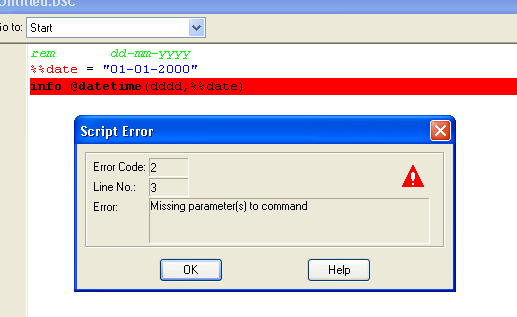
Maybe it is a regional thing but it should be corrected if Fabian is going to
distribute his scripts.
_________________
FreezingFire
VDSWORLD.com
Site Admin Team |
|
| Back to top |
|
|
Skit3000
Admin Team
Joined: 11 May 2002
Posts: 2166
Location: The Netherlands
|
| Posted: Sat Apr 12, 2003 2:58 pm Post subject: |
|
|
Try this:
| Code: | %%date = "01-01-2000"
runh "CMD /C date /T >c:\date.txt",wait
list create,9
list loadfile,9,c:\date.txt
%%datesep = @substr(@text(9),@diff(@len(@text(9)),7),@diff(@len(@text(9)),7))
list close,9
%%date = @substr(%%date,1,@pred(@pos(-,%%date)))%%datesep@substr(%%date,@succ(@pos(-,%%date)),999)
%%date = @substr(%%date,1,@pred(@pos(-,%%date)))%%datesep@substr(%%date,@succ(@pos(-,%%date)),999)
info @datetime(dddd,%%date) |
_________________
[ Add autocomplete functionality to your VDS IDE windows! ]
Voor Nederlandse beginners met VDS: bekijk ook eens deze tutorial! |
|
| Back to top |
|
|
FreezingFire
Admin Team
Joined: 23 Jun 2002
Posts: 3508
|
| Posted: Sat Apr 12, 2003 3:09 pm Post subject: |
|
|
That works.
_________________
FreezingFire
VDSWORLD.com
Site Admin Team |
|
| Back to top |
|
|
LOBO
Valued Contributor

Joined: 14 Mar 2002
Posts: 241
Location: Wilmington, Delaware, USA
|
| Posted: Sat Apr 12, 2003 4:36 pm Post subject: |
|
|
You can also use @datetime(/) to get the regional date seperator and @datetime(:) to get the regional time seperator.
| Code: |
%D = @datetime(/)
%T = @datetime(:)
info The regional date seperator as set in the control panel is: %D@cr()The regional time seperator as set in the control panel is: %T
exit
|
You can see using those options you could write a subroutine to take out the seperators without using the command prompt that Skit had in his example.
Regards,
- Mark
Last edited by LOBO on Sat Apr 12, 2003 4:40 pm; edited 1 time in total |
|
| Back to top |
|
|
Skit3000
Admin Team
Joined: 11 May 2002
Posts: 2166
Location: The Netherlands
|
|
| Back to top |
|
|
LOBO
Valued Contributor
Joined: 14 Mar 2002
Posts: 241
Location: Wilmington, Delaware, USA
|
| Posted: Sat Apr 12, 2003 4:42 pm Post subject: |
|
|
You're welcome  Wow I feel like I actually did something today  
- Mark |
|
| Back to top |
|
|
Skit3000
Admin Team
Joined: 11 May 2002
Posts: 2166
Location: The Netherlands
|
|
| Back to top |
|
|
Serge
Professional Member


Joined: 04 Mar 2002
Posts: 1480
Location: Australia
|
| Posted: Sat Apr 12, 2003 11:29 pm Post subject: |
|
|
hi all,
i too have a problem with the hyphen, but that aside, did anybody test the following code on today's date?
| Code: | rem dd-mm-yyyy
%%date = "01-01-2000"
info @datetime(dddd,%%date)
|
if i use | Code: | | %%date = "13-04-2003" |
without the hyphen, then it returns MONDAY when it should return SUNDAY
perhaps a clue to this lies in an earlier post http://forum.vdsworld.com/viewtopic.php?t=919&highlight=datetime where a whole number is a day but not necessarily the date as expressed by the code above
the question then is whole numbers count the days from what starting point??!?!??
Serge
_________________
|
|
| Back to top |
|
|
Skit3000
Admin Team
Joined: 11 May 2002
Posts: 2166
Location: The Netherlands
|
|
| Back to top |
|
|
Serge
Professional Member
Joined: 04 Mar 2002
Posts: 1480
Location: Australia
|
| Posted: Sun Apr 13, 2003 8:15 am Post subject: |
|
|
good point skit - we use dd-mm-yyyy here
using mm-dd-yyyy i got SUNDAY which is weird because my computer is set to use dd-mm-yyyy
Serge
_________________
|
|
| Back to top |
|
|
Skit3000
Admin Team
Joined: 11 May 2002
Posts: 2166
Location: The Netherlands
|
|
| Back to top |
|
|
Serge
Professional Member
Joined: 04 Mar 2002
Posts: 1480
Location: Australia
|
| Posted: Sun Apr 13, 2003 8:30 am Post subject: |
|
|
i don't think that should matter as my current settings should be the active ones...i just checked my settings and they are dd-mm-yyyy
a mystery 
Serge
_________________
|
|
| Back to top |
|
|
|

 FAQ
 Search
 Memberlist
 Usergroups
 Register
 Profile
 Log in to check your private messages
 Log in


 @vdsworld
