| View previous topic :: View next topic |
| Author |
Message |
Serge
Professional Member


Joined: 04 Mar 2002
Posts: 1480
Location: Australia
|
 Posted: Sat Jun 21, 2003 12:39 am Post subject: table and ide bugs Posted: Sat Jun 21, 2003 12:39 am Post subject: table and ide bugs |
 |
|
hi all,
i found a couple of "bugs"...perhaps somebody can confirm:
- using the TABLE element with the C option, i can't get the first left column centered although the second column does centre ok
- sometimes, for reasons unknown, the RUN button on the ide looks pressed even though i am not pressing it
- the line position of the cursor as reflected in the status bar is slow to respond and sometimes doesn't seem to until i move it using one of the directional arrows
overall, i think that vds 5 is awesome with lots of new and handy features
how come it says now COMMERCIAL RESEARCH LTD...what happened to SADE? in case i missed the news, can someone bring me up to speed please 
thanks
Serge
_________________
|
|
| Back to top |
|
 |
FreezingFire
Admin Team

Joined: 23 Jun 2002
Posts: 3508
|
| Posted: Sat Jun 21, 2003 10:49 am Post subject: Re: table and ide bugs |
|
|
| Serge wrote: | - using the TABLE element with the C option, i can't get the first left column centered although the second column does centre ok
...
how come it says now COMMERCIAL RESEARCH LTD...what happened to SADE? in case i missed the news, can someone bring me up to speed please
thanks
Serge |
What is the "C" option? 
Also, Commercial-Research, Ltd. is a new company formed and it will make
the future of VDS better... It's actually the same developers I think. 
_________________
FreezingFire
VDSWORLD.com
Site Admin Team |
|
| Back to top |
|
|
Skit3000
Admin Team

Joined: 11 May 2002
Posts: 2166
Location: The Netherlands
|
|
| Back to top |
|
|
FreezingFire
Admin Team
Joined: 23 Jun 2002
Posts: 3508
|
| Posted: Sat Jun 21, 2003 1:08 pm Post subject: |
|
|
But where was that ever documented? I can't find it in the help file.
_________________
FreezingFire
VDSWORLD.com
Site Admin Team |
|
| Back to top |
|
|
Skit3000
Admin Team
Joined: 11 May 2002
Posts: 2166
Location: The Netherlands
|
| Posted: Sat Jun 21, 2003 2:22 pm Post subject: |
|
|
| Code: | DIALOG CREATE,Nieuw Dialoog,-1,0,240,160
DIALOG ADD,STYLE,STYLE1,,,IUC,,
DIALOG ADD,TABLE,TABLE1,8,16,216,144,Column 1[80]|Column 2[80]|Column 3[80],STYLE1
DIALOG SHOW
list add,table1,sdfsdf@tab()sdfsdf@tab()sdfsdf
list add,table1,sdfsdf@tab()sdfsdf@tab()sdfsdf
wait event |
This way only the first column is centered...
_________________
[ Add autocomplete functionality to your VDS IDE windows! ]
Voor Nederlandse beginners met VDS: bekijk ook eens deze tutorial! |
|
| Back to top |
|
|
Dr. Dread
Professional Member

Joined: 03 Aug 2001
Posts: 1065
Location: Copenhagen, Denmark
|
| Posted: Sat Jun 21, 2003 2:36 pm Post subject: |
|
|
| FreezingFire wrote: | | But where was that ever documented? I can't find it in the help file. |
See "Dialog Elements" -> "TABLE"
Greetz
Dread
_________________
~~ Alcohol and calculus don't mix... Don't drink and derive! ~~
String.DLL * advanced string processing |
|
| Back to top |
|
|
FreezingFire
Admin Team
Joined: 23 Jun 2002
Posts: 3508
|
| Posted: Sat Jun 21, 2003 2:41 pm Post subject: |
|
|
Oh I see now... thanks.
| Code: | DIALOG CREATE,Nieuw Dialoog,-1,0,240,160
DIALOG ADD,TABLE,TABLE1,8,16,216,144,Column 1[80C]|Column 2[80C]|Column 3[80C]
DIALOG SHOW
list add,table1,sdfsdf@tab()sdfsdf@tab()sdfsdf
list add,table1,sdfsdf@tab()sdfsdf@tab()sdfsdf
wait event |
Then I think it would be like that.
_________________
FreezingFire
VDSWORLD.com
Site Admin Team |
|
| Back to top |
|
|
Serge
Professional Member
Joined: 04 Mar 2002
Posts: 1480
Location: Australia
|
| Posted: Sun Jun 22, 2003 12:07 am Post subject: |
|
|
hi ff,
that is what i did but it does not centre the first column...resize the column and you will see what i mean...the others are but not the first one
hi skit,
thanks for your idea...i was really after trying to make what ff did work (which is what i did)
thanks for your help
Serge
_________________
|
|
| Back to top |
|
|
FreezingFire
Admin Team
Joined: 23 Jun 2002
Posts: 3508
|
| Posted: Sun Jun 22, 2003 10:53 am Post subject: |
|
|
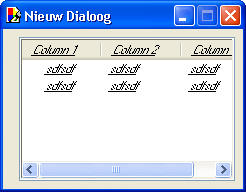
Hmm... Skit's example doesn't work here... (also I had to add a comma
for the style to work)
_________________
FreezingFire
VDSWORLD.com
Site Admin Team |
|
| Back to top |
|
|
Skit3000
Admin Team
Joined: 11 May 2002
Posts: 2166
Location: The Netherlands
|
|
| Back to top |
|
|
NathanH
Valued Newbie
Joined: 05 Sep 2001
Posts: 32
|
| Posted: Tue Jul 01, 2003 7:03 pm Post subject: |
|
|
I found that I could put in a zero width for the first column, and my 2nd column now shows up first, and the C L and R commands now work properly (of course you'll have to add a TAB to the front of each line of source data!)
This also gets rid of that gab that appears on the left hand edge of the first column.
A work around until it's fixed anyway
** This is good for display only, you now won't be able to click the first column to select a row, as you can't click in any other column besides the first to select rows...
| Code: |
DIALOG ADD,TABLE,TABLE1,40,1,420,280,EMPTY[0]|IP Address[120C]|User[160]
|
|
|
| Back to top |
|
|
Serge
Professional Member
Joined: 04 Mar 2002
Posts: 1480
Location: Australia
|
| Posted: Tue Jul 01, 2003 11:17 pm Post subject: |
|
|
interesting idea nathanh...but like you said, only for display purposes
serge
_________________
|
|
| Back to top |
|
|
Skit3000
Admin Team
Joined: 11 May 2002
Posts: 2166
Location: The Netherlands
|
|
| Back to top |
|
|
FreezingFire
Admin Team
Joined: 23 Jun 2002
Posts: 3508
|
| Posted: Wed Jul 02, 2003 11:44 am Post subject: |
|
|
Remember that you're forgetting a comma in the source code you posted.
I had to add the comma in order for the style to work. 
_________________
FreezingFire
VDSWORLD.com
Site Admin Team |
|
| Back to top |
|
|
Skit3000
Admin Team
Joined: 11 May 2002
Posts: 2166
Location: The Netherlands
|
|
| Back to top |
|
|
|

 FAQ
FAQ Search
 Memberlist
 Usergroups
 Register
 Profile
 Log in to check your private messages
 Log in


 @vdsworld