| View previous topic :: View next topic |
| Author |
Message |
FreezingFire
Admin Team

Joined: 23 Jun 2002
Posts: 3508
|
 Posted: Thu Dec 09, 2004 12:05 am Post subject: Shouldn't this be transparent? Posted: Thu Dec 09, 2004 12:05 am Post subject: Shouldn't this be transparent? |
 |
|
Shouldn't the background of this text be transparent?
| Code: | DIALOG CREATE,New Dialog,-1,0,240,160,INVISIBLE
DIALOG ADD,TEXT,test,46,146,,,test,,TRANSPARENT
DIALOG SHOW
wait event |
_________________
FreezingFire
VDSWORLD.com
Site Admin Team |
|
| Back to top |
|
 |
ShinobiSoft
Professional Member


Joined: 06 Nov 2002
Posts: 790
Location: Knoxville, Tn
|
| Posted: Thu Dec 09, 2004 12:11 am Post subject: |
|
|
Looks like it to me 
_________________
Bill Weckel
ShinobiSoft Software
"The way is known to all, but not all know it." |
|
| Back to top |
|
|
jules
Professional Member

Joined: 14 Sep 2001
Posts: 1043
Location: Cumbria, UK
|
| Posted: Thu Dec 09, 2004 9:34 am Post subject: |
|
|
The support for skinnable forms expects controls to be placed on the visible part of the window.
_________________
The Tech Pro
www.tech-pro.net |
|
| Back to top |
|
|
FreezingFire
Admin Team
Joined: 23 Jun 2002
Posts: 3508
|
| Posted: Thu Dec 09, 2004 9:38 pm Post subject: |
|
|
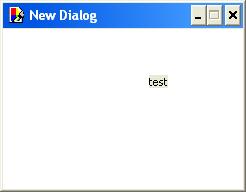
The background of this window is transparent, but the background of the
text is not transparent.
I've attached an example:
| Description: |
| The text background is not transparent. |
|
| Filesize: |
4.81 KB |
| Viewed: |
16196 Time(s) |
|
_________________
FreezingFire
VDSWORLD.com
Site Admin Team |
|
| Back to top |
|
|
GregLand
Valued Contributor


Joined: 15 Jun 2004
Posts: 212
Location: FRANCE
|
| Posted: Thu Dec 09, 2004 9:49 pm Post subject: |
|
|
Test this :
| Code: | DIALOG CREATE,New Dialog,-1,0,240,160,INVISIBLE,NOTITLE
DIALOG ADD,TEXT,test,46,146,,,test of the transparence,,TRANSPARENT,HAND,CLICK
DIALOG SHOW
wait event
:testclick
exit |
(Clic on the words to close the apply)
It's not completely transparent... but its a little best.. (little  ) )
I don't know if an API exist ? 
|
|
| Back to top |
|
|
PGWARE
Web Host

Joined: 29 Dec 2001
Posts: 1566
|
| Posted: Fri Dec 10, 2004 12:46 am Post subject: |
|
|
| I was almost sure tehre is an INVISIBLE style for text and bitmaps. Instead of using TRANSPARENT try puttign INVISIBLE in. I can't test it here but I'm almost positive there was a style for that.
|
|
| Back to top |
|
|
FreezingFire
Admin Team
Joined: 23 Jun 2002
Posts: 3508
|
| Posted: Fri Dec 10, 2004 1:05 am Post subject: |
|
|
@PK-It accepts the style but it's the same result.
@GregLand-Thanks - but again it gives the same result...
What I want to do is make a large clock that is able to be dragged around
on the screen. Kind of like http://www.softdemon.com/clock/
_________________
FreezingFire
VDSWORLD.com
Site Admin Team |
|
| Back to top |
|
|
jules
Professional Member
Joined: 14 Sep 2001
Posts: 1043
Location: Cumbria, UK
|
| Posted: Fri Dec 10, 2004 8:42 am Post subject: |
|
|
There is a VDS Clock example that was originally written by Garrett which I think is one of the examples distributed with VDS. It uses a bitmap to define the shape of the clock window. The transparency works fine when there is a visible surface (form or bitmap) behind the text, but you cannot have a control on an invisible part of the form.
_________________
The Tech Pro
www.tech-pro.net |
|
| Back to top |
|
|
|

 FAQ
FAQ Search
 Memberlist
 Usergroups
 Register
 Profile
 Log in to check your private messages
 Log in


 @vdsworld