| View previous topic :: View next topic |
| Author |
Message |
jwfv
Valued Contributor

Joined: 19 Mar 2002
Posts: 422
Location: Beaufort, SC
|
 Posted: Tue Mar 15, 2005 2:53 pm Post subject: Help on sending keystrokes to browser element Posted: Tue Mar 15, 2005 2:53 pm Post subject: Help on sending keystrokes to browser element |
 |
|
I have an application that allows the user to sort through various document types. One of the types is .PDF. I load the file in the browser element and it is displayed in the Adobe Acrobat reader.
I want to do two things:
1.) Send keystrokes to the browser window. (For instance, I would like to send Ctrl-D to show the document properties, without the user having to enter Ctrl-D.) I have set the focus to that element, but I can't get the WINDOW SEND to work correctly. I don't know if I need to specify that particular sub-window, and I don't know how to do that anyway. I have included below the relevant windows from a LIST WINLIST that I generated.
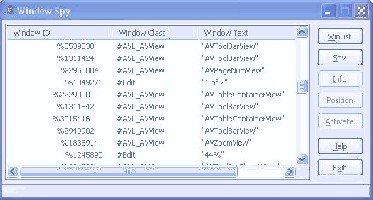
2.) I noticed that the Acrobat Reader displays some useful information when I used Windows Spy to look at the active windows. I want to be able to retrieve that information. For instance, in the jpeg below, you can see there is a window called "#Edit" with a text of "1 of 2". How can I retrieve that information (so I know what page is currently displayed in the browser?) That window (#Edit) doesn't show up when I did LIST WINLIST.
I know this is a long post, but any nudge in the right direction is much appreciated. I have not worked with window identifiers before.
Winlist:
#CiceroUIWndFrame|%65802|TF_FloatingLangBar_WndTitle
#CiceroUIWndFrame|%131322|CiceroUIWndFrame
#Shell_TrayWnd|%196670|
#tooltips_class32|%1704858|
#tooltips_class32|%327834|
#tooltips_class32|%327892|
#AVL_AVWindow|%67140|Adobe Acrobat
#TabletPenServiceHelperClass|%787130|
#EMSInfoClassAPI|%65810|AVG E-mail Scanner
#tooltips_class32|%65698|
#NDDEAgnt|%65574|NetDDE Agent
#CiceroUIWndFrame|%131746|CiceroUIWndFrame
#CiceroUIWndFrame|%131748|CiceroUIWndFrame
#tooltips_class32|%66098|
#tooltips_class32|%131606|
#ATL:036605D0|%2425704|AXWIN Frame Window
#Static|%2097776|sw
#Static|%1376572|sw
#Static|%1508040|sw
#Static|%1311650|sw
#Static|%1180582|sw
#Static|%262688|_acroS_win
##43|%590044|MCI command handling window
#tooltips_class32|%65686|
#tooltips_class32|%327848|
#DV2ControlHost|%1245456|Start Menu
#tooltips_class32|%65674|
#tooltips_class32|%65672|
#tooltips_class32|%65668|
#tooltips_class32|%65670|
#TVDSDialog|%459774|Pdf Test 1
#Static|%721702|sw
#Static|%984030|sw
#Internet Explorer_Hidden|%525260|
#TPUtilWindow|%2556908|
#CicLoaderWndClass|%65796|
##43|%198296|MCI command handling window
#Static|%263694|sw
#Static|%1115578|sw
#Static|%525684|sw
#Static|%198186|sw
#Static|%329048|sw
#Static|%329102|sw
#Static|%1180382|sw
#Static|%2818936|sw
#Static|%66996|sw
#Static|%66994|sw
#ATL:036605D0|%66986|AXWIN Frame Window
#CoolTypeFontChange|%66960|Font Capture
#Static|%66842|sw
#Static|%66838|sw
#OleDdeWndClass|%66834|DDE Server Window
#DDEMLEvent|%66830|
#DDEMLMom|%66826|
#AVL_AVWindow|%132280|
#DDEMLEvent|%66696|
#DDEMLMom|%66692|
#EWHAcrobatTransportWindow6|%66678|transport Window
#Static|%132210|_acroT_win
#AdobeAcrobat|%66652|Adobe Reader
#AcrobatTimerWnd|%66648|
#Acrobat Viewer|%66644|
#tooltips_class32|%131698|
#tooltips_class32|%66118|
#tooltips_class32|%66106|
#tooltips_class32|%66092|
#tooltips_class32|%66082|
#tooltips_class32|%131584|
#tooltips_class32|%66042|
| Description: |
|
| Filesize: |
35.99 KB |
| Viewed: |
1581 Time(s) |
|
_________________
Joe Floyd |
|
| Back to top |
|
 |
ShinobiSoft
Professional Member


Joined: 06 Nov 2002
Posts: 790
Location: Knoxville, Tn
|
| Posted: Tue Mar 15, 2005 3:17 pm Post subject: |
|
|
If I'm not mistaken, for the WINDOW SEND command, you will need to send
the command to "Internet Explorer Server".
For your second question, I have no idea  Sorry. Sorry.
_________________
Bill Weckel
ShinobiSoft Software
"The way is known to all, but not all know it." |
|
| Back to top |
|
|
marty
Professional Member

Joined: 10 May 2001
Posts: 789
|
| Posted: Tue Mar 15, 2005 3:20 pm Post subject: |
|
|
I am interested in the solution also. Since the browser element does not support the TAB key and some others.
I tried with Window Send and it never worked for me anyway.
|
|
| Back to top |
|
|
ShinobiSoft
Professional Member
Joined: 06 Nov 2002
Posts: 790
Location: Knoxville, Tn
|
| Posted: Tue Mar 15, 2005 4:00 pm Post subject: |
|
|
Here you go guys, this will pull up the Properties dialog from the file menu
| Code: |
run iexplore.exe
wait 3
%%active = @winactive(I)
if %%active
%%tmp = @window(%%active,CHILD)
if %%tmp
repeat
%%tmp = @window(%%tmp,NEXT)
until @equal(@winclass(%%tmp), Shell DocObject View)@null(%%tmp)
if @not(@null(%%tmp))
%%ieServ = @window(%%tmp, CHILD)
rem WM_SETFOCUS
%z = @sendmsg(%%active, 7, 0, 0)
window send,%%ieServ,@alt(F)r
end
end
end
|

_________________
Bill Weckel
ShinobiSoft Software
"The way is known to all, but not all know it." |
|
| Back to top |
|
|
ShinobiSoft
Professional Member
Joined: 06 Nov 2002
Posts: 790
Location: Knoxville, Tn
|
| Posted: Tue Mar 15, 2005 4:15 pm Post subject: |
|
|
One other note,
You may need to specify the full path to IE.
_________________
Bill Weckel
ShinobiSoft Software
"The way is known to all, but not all know it." |
|
| Back to top |
|
|
jwfv
Valued Contributor
Joined: 19 Mar 2002
Posts: 422
Location: Beaufort, SC
|
| Posted: Tue Mar 15, 2005 4:39 pm Post subject: |
|
|
Bill:
Thanks for the reply. Your example works well (instead of putting the path to iexplore.exe, I used "shell open, http://www.yahoo.com")
But when i try it with the browser element, it doesn't work. I get an error. I tracked it to this line:
| Code: | | until @equal(@winclass(%%tmp), Shell DocObject View)@null(%%tmp) |
%%Tmp is becoming NULL before it finds Shell DocObject View. I put some code in to follow what it finds. It seems to find some TVDSBitBtn objects and then a ShellView object, then turns NULL.
Is it because just before calling the code, the user presses a BitBtn object, and that has focus?
_________________
Joe Floyd |
|
| Back to top |
|
|
jwfv
Valued Contributor
Joined: 19 Mar 2002
Posts: 422
Location: Beaufort, SC
|
| Posted: Tue Mar 15, 2005 5:13 pm Post subject: |
|
|
Looking over some past threads, I guess the bigger question that needs answering is "Can you send keystrokes to the browser element?"
There have been threads about sending the "tab" key to the browser, but it doesn't look like anything was resolved.
_________________
Joe Floyd |
|
| Back to top |
|
|
ShinobiSoft
Professional Member
Joined: 06 Nov 2002
Posts: 790
Location: Knoxville, Tn
|
| Posted: Tue Mar 15, 2005 5:42 pm Post subject: |
|
|
Sorry jwfv, I didn't try this with the VDS browser element. Only with IE itself.
As you can see from my example it is possible to send keystrokes to the
browser. I think the problem lies in the quick logic I used to locate the
"Internet Explorer_Server". If you're not in a hurry, I've some other things to
do, but when I get a chance I'll see if I can make an example that works with
the VDS browser element. 
_________________
Bill Weckel
ShinobiSoft Software
"The way is known to all, but not all know it." |
|
| Back to top |
|
|
ShinobiSoft
Professional Member
Joined: 06 Nov 2002
Posts: 790
Location: Knoxville, Tn
|
| Posted: Tue Mar 15, 2005 5:45 pm Post subject: |
|
|
| jvfw wrote: |
Is it because just before calling the code, the user presses a BitBtn object, and that has focus? |
That is a very good possibliity. The other problem is that with key strokes,etc.,
when using an external element, don't always make it back to VDS.
_________________
Bill Weckel
ShinobiSoft Software
"The way is known to all, but not all know it." |
|
| Back to top |
|
|
jwfv
Valued Contributor
Joined: 19 Mar 2002
Posts: 422
Location: Beaufort, SC
|
| Posted: Tue Mar 15, 2005 6:20 pm Post subject: |
|
|
Thanks, Bill - for your help.
I just feel certain that there has to be a way to do this!
_________________
Joe Floyd |
|
| Back to top |
|
|
ShinobiSoft
Professional Member
Joined: 06 Nov 2002
Posts: 790
Location: Knoxville, Tn
|
| Posted: Tue Mar 15, 2005 9:40 pm Post subject: |
|
|
Ok, we can pull up the properties dialog with the following code, but I'm still
not sure about sending anything else to the browser. Essentially what I've
done is figured out what command id refers to the Properties menu item
that appears in the browser elements RCLICK context menu.
| Code: |
run c:\vds\tools\browser.exe
repeat
wait 0.1
%I = @winactive(C)
until @equal(%I,BillsBrowser)
window activate,#BillsBrowser
wait 2
%%active = @winactive(C)
if @equal(%%active,BillsBrowser)
%%active = @winactive(I)
%%tmp = @window(%%active,CHILD)
if %%tmp
rem Find "Shell Embedding"
repeat
%%tmp = @window(%%tmp,NEXT)
until @equal(@winclass(%%tmp),Shell Embedding)@null(%%tmp)
if @not(@null(%%tmp))
rem Now find "Shell DocObject View"
%%shellDocObj = @window(%%tmp,CHILD)
rem Now find "Internet Explorer_Server"
%%ieServ = @window(%%shellDocObj, CHILD)
rem WM_COMMAND = 273
rem Properties -> menu command = 28
%z = @sendmsg(%%ieServ, 273, 28, 0)
end
end
end
|
With some experimenting, I can retrieve the menu command IDs for all of
the context menu items.
You will obviously need to change anything referring to BillsBrowser to the
classname, etc for your browser element.
_________________
Bill Weckel
ShinobiSoft Software
"The way is known to all, but not all know it." |
|
| Back to top |
|
|
jwfv
Valued Contributor
Joined: 19 Mar 2002
Posts: 422
Location: Beaufort, SC
|
| Posted: Tue Mar 15, 2005 9:56 pm Post subject: |
|
|
Interesting.
Question: how did you know that "28" was the message to send to that window to display the properties?
Now -
I don't know that this example helps, however. When the browser uses the Acrobat Viewer to display a PDF, the command CTRL-D pulls up a custom properties dialog, which is what I want to display ...
_________________
Joe Floyd |
|
| Back to top |
|
|
jwfv
Valued Contributor
Joined: 19 Mar 2002
Posts: 422
Location: Beaufort, SC
|
| Posted: Tue Mar 15, 2005 10:00 pm Post subject: |
|
|
Is there a way to cycle through all windows and child windows and child-child windows, sending a certain key combination to each one until we find which one is the right one? (Not an elegant solution, granted.)
For instance, in Acrobat Viewer v 7.0 (and probably earlier ones), the F8 key toggles the display of the toolbars.
_________________
Joe Floyd |
|
| Back to top |
|
|
ShinobiSoft
Professional Member
Joined: 06 Nov 2002
Posts: 790
Location: Knoxville, Tn
|
| Posted: Tue Mar 15, 2005 10:01 pm Post subject: |
|
|
| jwfv wrote: |
Question: how did you know that "28" was the message to send to that window to display the properties? |
I have most of Microsofts development tools. I used Window SpyXX that
comes with Visual C++ 6.0 to determine the menu command id.
As for your other question, if you can get a handle to the acrobat window,
you should be able to send it @ctrl(D) to get the properties dialog you are
referring to. 
_________________
Bill Weckel
ShinobiSoft Software
"The way is known to all, but not all know it." |
|
| Back to top |
|
|
ShinobiSoft
Professional Member
Joined: 06 Nov 2002
Posts: 790
Location: Knoxville, Tn
|
| Posted: Tue Mar 15, 2005 10:04 pm Post subject: |
|
|
I will experiment with this one for a bit, to see if I can come up with a
solution. As for cycling thru all the child windows that is certainly a possibility.
I've never paid any attention to Adobe Acrobat so with out expermenting, I
can't say for sure.
_________________
Bill Weckel
ShinobiSoft Software
"The way is known to all, but not all know it." |
|
| Back to top |
|
|
|

 FAQ
FAQ Search
 Memberlist
 Usergroups
 Register
 Profile
 Log in to check your private messages
 Log in


 @vdsworld