| View previous topic :: View next topic |
| Author |
Message |
FreezingFire
Admin Team

Joined: 23 Jun 2002
Posts: 3508
|
 Posted: Tue Jan 20, 2004 7:28 pm Post subject: Record wave out mix (system output) Posted: Tue Jan 20, 2004 7:28 pm Post subject: Record wave out mix (system output) |
 |
|
Is there a way to record the wave out mix (like what you hear through your computer speakers) using VDS? Perhaps using MCI? Or does a DLL
exist for this?

Thanks in advance for any help. 
_________________
FreezingFire
VDSWORLD.com
Site Admin Team |
|
| Back to top |
|
 |
Garrett
Moderator Team
Joined: 04 Oct 2001
Posts: 2149
Location: A House
|
| Posted: Tue Jan 20, 2004 11:12 pm Post subject: |
|
|
I do believe it is possible using the @mci(). I remember years ago
someone saying that we could do that in VDS. I just never ventured
to give it try.
_________________
'What you do not want done to yourself, do not do to others.' - Confucius (550 b.c. to 479 b.c.) |
|
| Back to top |
|
|
CodeScript
Moderator Team

Joined: 08 Jun 2003
Posts: 1060
Location: India
|
|
| Back to top |
|
|
FreezingFire
Admin Team
Joined: 23 Jun 2002
Posts: 3508
|
| Posted: Wed Jan 21, 2004 6:55 pm Post subject: |
|
|
Excellent CodeScript!! Thank you SO MUCH!!  
_________________
FreezingFire
VDSWORLD.com
Site Admin Team |
|
| Back to top |
|
|
CodeScript
Moderator Team
Joined: 08 Jun 2003
Posts: 1060
Location: India
|
| Posted: Thu Jan 22, 2004 2:33 am Post subject: |
|
|
Happy to Help 
_________________
Regards
- CodeScript
 Give your application a professional look with the VDSGUI Extension Give your application a professional look with the VDSGUI Extension |
|
| Back to top |
|
|
FreezingFire
Admin Team
Joined: 23 Jun 2002
Posts: 3508
|
| Posted: Thu Jan 22, 2004 6:18 pm Post subject: |
|
|
I'm really impressed with it... It also works, I never mentioned that yet. 
Is there a way to change the quality of the recording, ex. when I record
the bitrate sounds lower. No problem if there isn't, but I'm just wondering.
Thanks again.
_________________
FreezingFire
VDSWORLD.com
Site Admin Team
Last edited by FreezingFire on Thu Jan 22, 2004 6:35 pm; edited 1 time in total |
|
| Back to top |
|
|
FreezingFire
Admin Team
Joined: 23 Jun 2002
Posts: 3508
|
| Posted: Thu Jan 22, 2004 6:35 pm Post subject: |
|
|
Actually I just found this in the MCI reference - but I'm not sure which to
set: bitspersample or samplespersec.
| Code: | | set mysound time format ms bitspersample 8 channels 1 samplespersec 11025 |
_________________
FreezingFire
VDSWORLD.com
Site Admin Team |
|
| Back to top |
|
|
Skit3000
Admin Team

Joined: 11 May 2002
Posts: 2166
Location: The Netherlands
|
|
| Back to top |
|
|
FreezingFire
Admin Team
Joined: 23 Jun 2002
Posts: 3508
|
| Posted: Thu Jan 22, 2004 6:53 pm Post subject: |
|
|
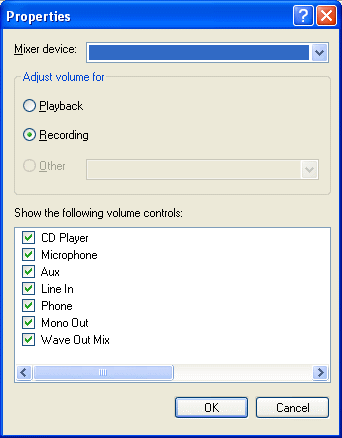
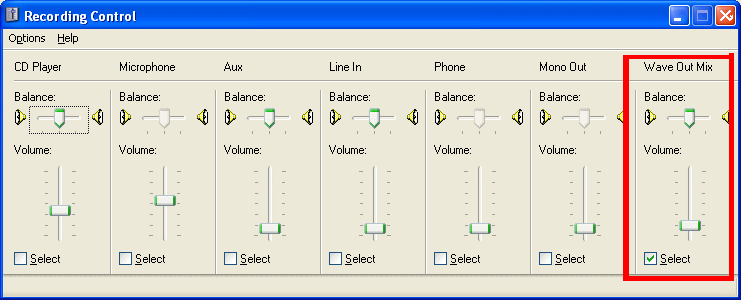
You have to select the right device to record. If you can't find it elsewhere,
run this code to open the Windows Sound control panel mixer:
Then click on Options > Properties, click the "recording" radio button,
then look at the following screenshots to make sure yours looks somewhat
like it:
_________________
FreezingFire
VDSWORLD.com
Site Admin Team |
|
| Back to top |
|
|
Skit3000
Admin Team
Joined: 11 May 2002
Posts: 2166
Location: The Netherlands
|
|
| Back to top |
|
|
CodeScript
Moderator Team
Joined: 08 Jun 2003
Posts: 1060
Location: India
|
| Posted: Fri Jan 23, 2004 2:03 am Post subject: |
|
|
Hi FF
I think if you alter samplespersec to other than 1 then prolly you need to play back at the same rate else it will be too fast or too slow ?
I am not sure about this may be Vic can tell more.
Hi Skit
As for getting or setting a mixer property I think you need to call winmm.dll and use something like mixerSetControlDetails - said to be one of the difficult areas of API programming. I don't know if a simpler method exits - other than opening the default mixer panel.
_________________
Regards
- CodeScript
Give your application a professional look with the VDSGUI Extension |
|
| Back to top |
|
|
|

 FAQ
FAQ Search
 Memberlist
 Usergroups
 Register
 Profile
 Log in to check your private messages
 Log in


 @vdsworld